




Shopify + ShopMCP
See orders, products, customers, and stock together so you can act on store issues faster.
Start your 14-day free trial — no credit card required.
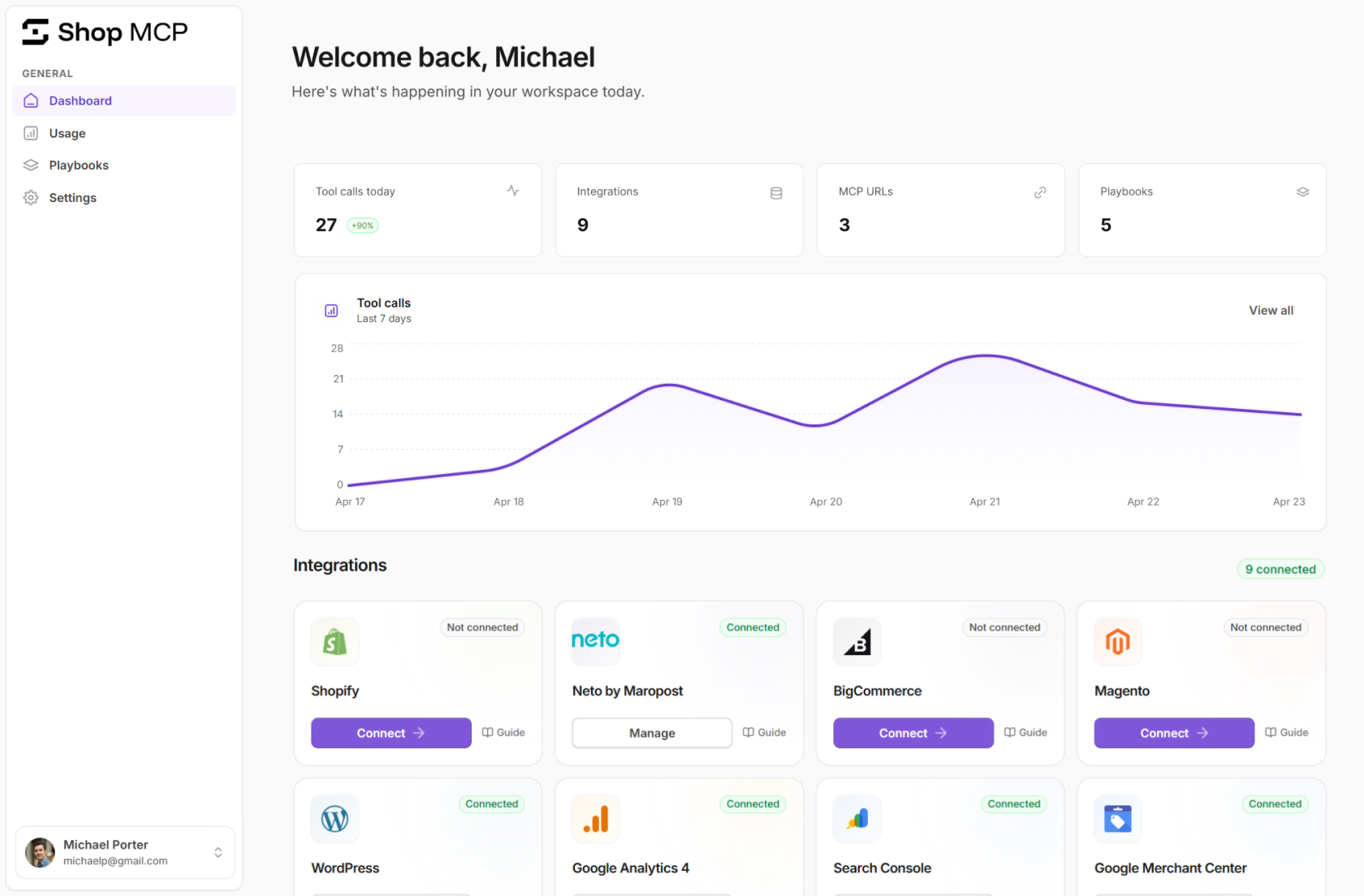
Run your connected Shopify stores from one chat in Claude or ChatGPT. Review orders, stock and revenue across your commerce stack.
Connect Shopify to Claude or ChatGPT. Review orders, inventory and product performance alongside your marketing and finance data.
Try asking: “Which products sold most in the last 30 days, and which are running low on stock?” Start with read-only access; connection limits depend on your plan.
What's now possible with Shopify in Claude or ChatGPT
You stop the morning admin-screen lap. You start asking the questions.
- "What came in across all stores yesterday — revenue, orders, top 3 SKUs each." Portfolio rollup before stand-up. Times zones already handled per store.
- "Refund order #1023 partial £40 against the navy-medium variant and restock it." One sentence. A gated write: review the result before retrying.
- "Every fulfilment on hold right now, with the hold reason." The hidden queue that quietly tanks delivery SLA. Surface it daily, release it from the same chat.
- "Flag every published product without a meta description, sorted by 30-day revenue." The SEO contractor's to-do list, in 20 seconds instead of a Saturday morning of CSV joins.
- "Audit B2B Company 'Bauer Supply' — which locations are pinned to price lists not updated in 90+ days?" The B2B mess the admin UI was never designed to surface.
- "Show me draft orders sitting older than 14 days across every store." The forgotten quotes that should already be invoices.
- "Every customer who spent over £5k in the last 12 months but hasn't ordered in 60 days." Win-back list for Klaviyo, ready to push.
- "List every product missing alt text on its hero image." Accessibility + image SEO audit, every store, one prompt.
- "Inventory below threshold at our Sydney location, across every store." The reorder list, pre-coffee.
- "Push these 12 products live to the wholesale channel." Multi-channel publishing without re-learning the publishing UI per store.
Reads are on out of the box. Writes — refunds, fulfilments, draft orders, inventory transfers, B2B writes, publication, Flow triggers, metaobject CRUD — are off behind a per-workspace switch. Money-moving actions use guarded writes and require result checks before retries.
Paste-ready prompts
These prompts show what is possible once the relevant Shopify permissions and plan connections are in place.
"What came in across all stores yesterday — revenue, order count, top 3 SKUs per store."
Fans across every connected `.myshopify.com` store, scopes to `created_at >= yesterday`, renders dates in each store's local timezone (so a 9am Sydney order doesn't get misfiled). Drop the table into Slack and your morning standup brief is written.
"Refund order #1023 partial £40 against the navy-medium variant and restock it."
Looks up the order by name, builds a line-item refund payload, prepares a guarded write and submits it after review. The customer-service decision your agent used to escalate to ops — now resolvable in the chat where the customer raised it.
"For B2B Company 'Bauer Supply', list every location and flag the ones pinned to price lists not updated in 90+ days."
Walks Company → locations → catalogues → price lists, surfaces the last-updated stamp on every fixed-price entry. The exact trade customers running on a stale price book. Wholesale revenue you didn't know you were leaving on the table.
"Every fulfilment order on hold across all stores, with the hold reason."
The hidden queue. The six hold reasons render inline. To release a hold from the same chat, the next call is one prompt away — gated by your writes switch.
"Every published product without a meta description, sorted by 30-day revenue."
The SEO punch-list you've been meaning to commission since launch. Walks products, joins metafields, ranks by sales. Hand the result to a copywriter and it's done by Friday.
The cross-integration plays you can't get from a single-store MCP
A single-store Shopify MCP can answer Shopify questions. The interesting questions live across your stack — Shopify ↔ Klaviyo, Shopify ↔ Xero, Shopify ↔ GA4, Shopify ↔ Google Ads. ShopMCP runs the join.
Catalogue → ad performance leak
For every product spending more than £X in Google Ads, check the GMC feed status and the product page health (alt text, meta description, schema). Surfaces the products burning ad budget while disapproved or under-optimised.
High-value customer × email engagement
Top 100 customers by lifetime spend across all stores, joined to last Klaviyo engagement. The "you're paying to acquire them, then losing them quietly" segment.
Shopify orders × Xero invoices reconcile
Yesterday's orders that don't have a matching Xero ACCREC invoice yet. The sync-broke-and-nobody-noticed problem, surfaced daily instead of at month-end. Pairs with the Xero integration.
Channel revenue × ad spend by store
Every store, every channel, last 28 days — revenue, ad spend, blended ROAS, side-by-side. The portfolio-level question your reporting stack can't answer without three exports and a pivot.
Built for the four people who actually use Shopify
Agencies with multiple client stores. Connect stores within your plan limits and work from one chat. "Show me every client below pace for the month" returns a triage list. The week-one client call goes from "let me pull that up" to "here's the answer, here's what I'd do next."
Multi-brand operators and holding companies. Three D2C brands, one ops team, one chat. Inventory across all stores, revenue across all stores, fulfilment holds across all stores. The portfolio view your finance team builds in a spreadsheet, except live.
Heads of Ecom, fractional Heads of Ecom. The work used to be "manage the team that pulls the report." Now the report is one prompt. Spend the saved hours on the things that need your judgement — pricing, positioning, brand calls — not the things a chat can do.
Customer service and ops leads. Refunds, fulfilment holds, draft orders, returns — the daily decisions, surfaced and resolvable in one place. The admin UI is still there for the cases that need it.
Connect Shopify to ShopMCP
- Create a merchant-owned app in the Shopify Dev Dashboard and grant the scopes your workflow needs.
- Connect the store in ShopMCP using its app credentials. Repeat for additional stores within your plan limits.
- Open Claude, ChatGPT, or Cursor and ask your first question.
ShopMCP also supports an OAuth connection path. Manage your connected stores from workspace settings; connection limits depend on your plan.
Safety, in plain English
- Reads-only until you say otherwise. Out of the box, writes are off. Flip the per-workspace Allow writes switch when you trust the workflow.
- You control the scopes. ShopMCP can only use the scopes granted to its Shopify connection. Grant the write scopes needed for each workflow.
- Every action is logged. Per-tool audit trail with timestamp, store, tool name, and outcome — the receipts your finance or compliance team will ask for.
- Guarded money moves. Guarded write tools log actions and surface outcomes. Check the result before retrying a money-moving operation.
When to use ShopMCP, when to stay in Shopify admin
The Shopify admin UI is right for one-off product edits, theme work, and the moments where you want to click around. ShopMCP is right for the questions the UI can't answer in one screen:
- "Across my connected stores, which ones are below pace for the week?"
- "Which customers spent over £5k last year and haven't ordered in 60 days?"
- "Find every B2B Company location running on a stale price list."
- "Every fulfilment on hold right now, across the portfolio."
Shopify also ships its own MCP endpoints — a Storefront MCP for shopping assistants (buyer-side, single store) and a Dev/Admin Toolkit for engineers building on one store. Use those if you're a shopper or a developer. Use ShopMCP when you run the portfolio. Full disambiguation in ShopMCP vs Shopify's Storefront MCP.
What's under the hood
ShopMCP's Shopify connector ships 222 tools across the Admin GraphQL API (2026-07) — products, variants, collections, orders, fulfilments, customers, returns, gift cards, discounts, inventory, content, metafields, metaobjects, B2B Companies, Catalogs, Price Lists, Markets, Publications, Flow triggers, and validation helpers. 109 are read-only; 113 are gated writes that stay off until you flip the workspace switch.
Full endpoint-by-endpoint reference: the Shopify integration spec.
Works with
Claude (Desktop, web, Claude Code), ChatGPT (with MCP support), Cursor, and any MCP-compatible assistant — Continue, Cline, Zed, your own client. Connect each store within your plan limits and use the hosted ShopMCP connection.
Pricing
Shopify MCP is included in every ShopMCP workspace. Plans set workspace and connection limits; see the current USD pricing for details. See pricing.
Frequently asked questions
What can I actually ask Shopify through Claude or ChatGPT?
Many questions you'd open Shopify admin for, plus the cross-store questions admin was never built to answer. Revenue and orders by store, day, channel, or product; customer lookups; inventory levels; fulfilment status; B2B Company and price-list audits; product catalogue health (meta descriptions, alt text, schema). Once writes are on, you can also refund orders, release fulfilment holds, create draft orders, transfer inventory between locations, publish products to channels, and trigger Shopify Flow workflows.
Can Claude make changes to my store, or only read?
Reads-only until you decide otherwise. When you're ready, flip the per-workspace Allow writes switch and grant the matching Shopify write scopes to your connection. Review the outcome of each money-moving action before retrying. Every action is logged. You can turn writes back off at any time.
Does it work across multiple Shopify stores?
Yes — that's the headline use case. Connect stores within your plan limits. ShopMCP routes a call to a selected `.myshopify.com` store, and supported workflows can compare connected stores. You can also ask about a single store by name.
How is this different from Shopify's own MCP?
Shopify ships two MCP endpoints today. Storefront MCP is buyer-side — shopping assistants use it to answer "do you have this in size 9?" on one store. The Dev/Admin Toolkit is for one engineer building one app on one store. ShopMCP sits in a different lane: operator-and-agency. One ShopMCP workspace brings a broad, governed Shopify Admin toolkit across connected stores within your plan, gated writes, and the rest of your stack (Klaviyo, GA4, Google Ads, Stripe, Xero, GSC, GMC) in the same chat.
Is the connection secure?
Yes. The recommended path uses merchant-owned Shopify Dev Dashboard app credentials with the scopes you grant. ShopMCP also supports Shopify OAuth. Credentials are protected in ShopMCP, and you can disconnect a store from workspace settings.
What if I run one store, not ten?
Single-store operators use ShopMCP too — choose the plan that fits and connect one store. You can still combine Shopify with Klaviyo, Xero, GA4 or Google Ads when those platforms are connected. If you're a solo developer building against a single store, Shopify's Dev/Admin Toolkit is a fine fit too — ShopMCP is the operator surface.
Related reading
- Keystone: The complete guide to Shopify MCP
- Disambiguation: ShopMCP vs Shopify's Storefront MCP
- Pair with: Klaviyo MCP — the email layer for high-value customers
- Pair with: Xero MCP — order ↔ invoice reconciliation
- Pair with: GA4 MCP — channel revenue and attribution
Connect Shopify — start your free trial
Your connected stores, one chat, every cross-platform question answered in plain English. Reads-only by default — flip writes when you're ready. Start your connection.
Your coffee's still warm. Your Monday review is done.
Connect one platform in 5 minutes. Run your first playbook before the kettle boils.


2026 Copyright © ShopMCP. All rights reserved. A Perceptiv Digital initiative.