
Shopify
What is Shopify MCP? The Complete Guide for 2026
Date
April 07, 2026
Author
Igor Cerjan
Shopify MCP is a Model Context Protocol implementation that lets you query, edit, and operate your Shopify store from Claude, ChatGPT, or Cursor using plain-English instructions instead of dashboards. If you run multiple stores — your own or your clients' — it replaces the click-into-each-admin-tab routine with a single conversation that has read-and-write access to every platform behind your store.
This is the operator's guide. It covers what MCP is, the three flavors of "Shopify MCP" you'll see in 2026 (and which one you actually want), what people do with it on Monday morning, and what it doesn't do yet. If you're an agency owner running ten clients in Claude Code, this is the post that should bookmark.
What is MCP, in one sentence
The Model Context Protocol (MCP) is an open standard, introduced by Anthropic in late 2024, that lets AI assistants connect to tools and data sources through a single shared protocol — instead of every AI client building its own one-off integration with every SaaS product. The official MCP specification is open and community-maintained; multiple AI clients (Claude Desktop, Claude Code, Cursor, ChatGPT on supported plans, and a growing list of third-party agents) implement it.
Before MCP, if you wanted Claude to read your Shopify orders and ChatGPT to do the same thing, somebody had to build two integrations. Then if Cursor wanted to do it too, three. The combinatorial math gets ugly fast — N AI clients × M data sources = N×M integrations, none of which talk to each other.
MCP collapses that into N + M. A single Shopify MCP server speaks to any MCP-compatible client. A single Claude installation can connect to any MCP-compatible data source. The protocol is the contract; everything else is plumbing.
For ecommerce, this matters because the operator's job is fundamentally cross-platform: orders live in Shopify, email lives in Klaviyo, ads live in Google Ads, attribution lives wherever you've decided to track it this quarter. MCP is the first time you can ask a single AI assistant to look at all of those at once and just answer the question.
What is Shopify MCP, specifically
Shopify MCP is the umbrella term for any MCP server that connects to a Shopify store. There are several. They do different jobs.
In its most useful form — the one this guide focuses on — a Shopify MCP server gives an AI assistant tool-level access to your store data:
- Read orders, customers, products, inventory, fulfillments, draft orders, payouts, refunds.
- Write product updates, inventory adjustments, draft order creation, discount codes.
- Cross-reference with adjacent platforms — your email tool, your ads accounts, your analytics — when you've connected those too.
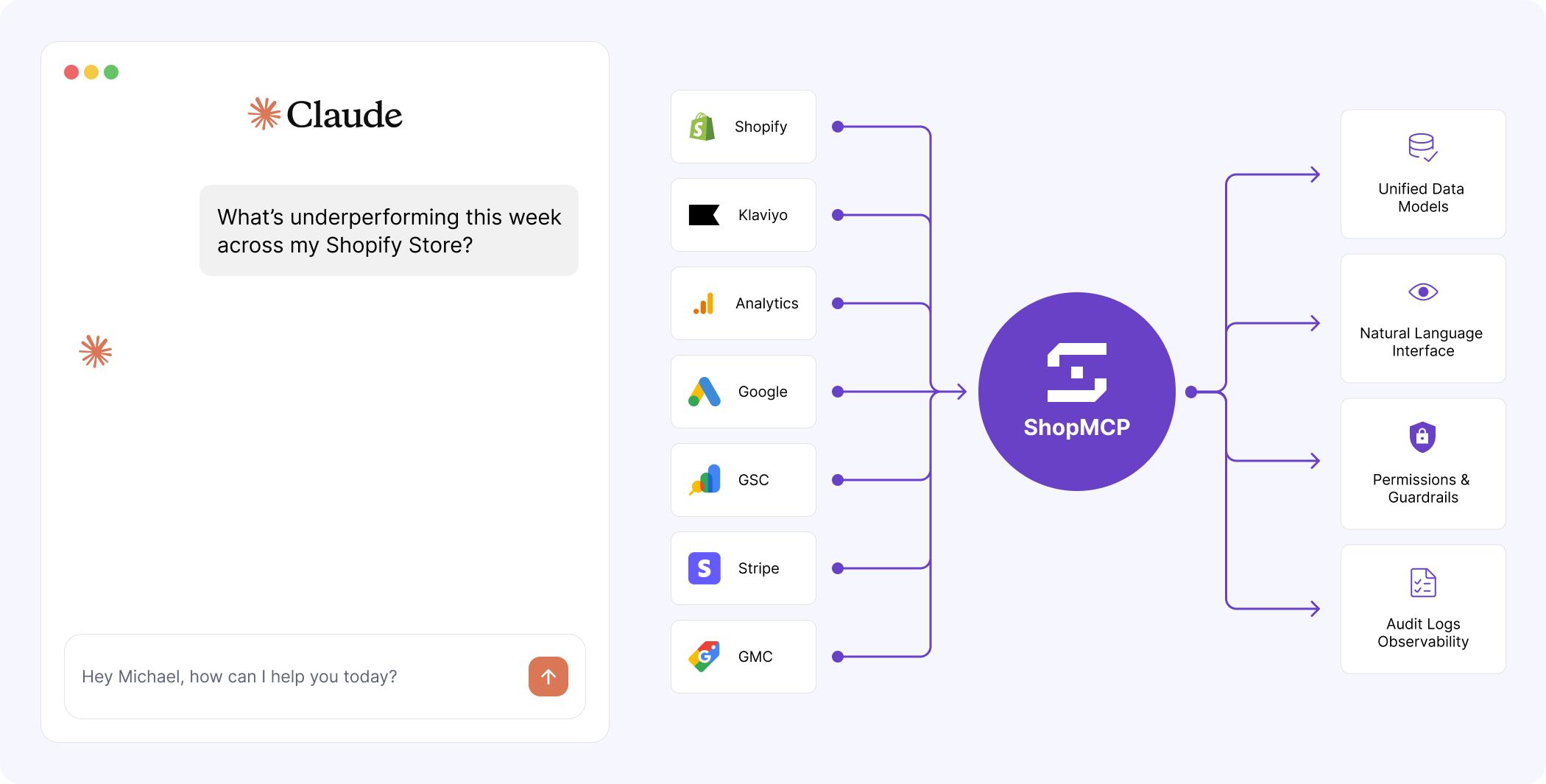
When you wire an MCP server into Claude Desktop or ChatGPT, your prompts become operations. "Which products had stockouts last week?" becomes a real query against the Shopify API, returns a real list, and you can immediately follow up with "Bump inventory for the top three by 50 units each" — and watch the writes happen.
The interesting question isn't whether Shopify MCP exists — it does, in several forms. The interesting question is which one you should use. That depends on who you are.
Three flavors of "Shopify MCP" — and why the difference matters
When someone says "Shopify MCP" in 2026, they could be referring to one of three things. They are not interchangeable. Mixing them up costs you a week.
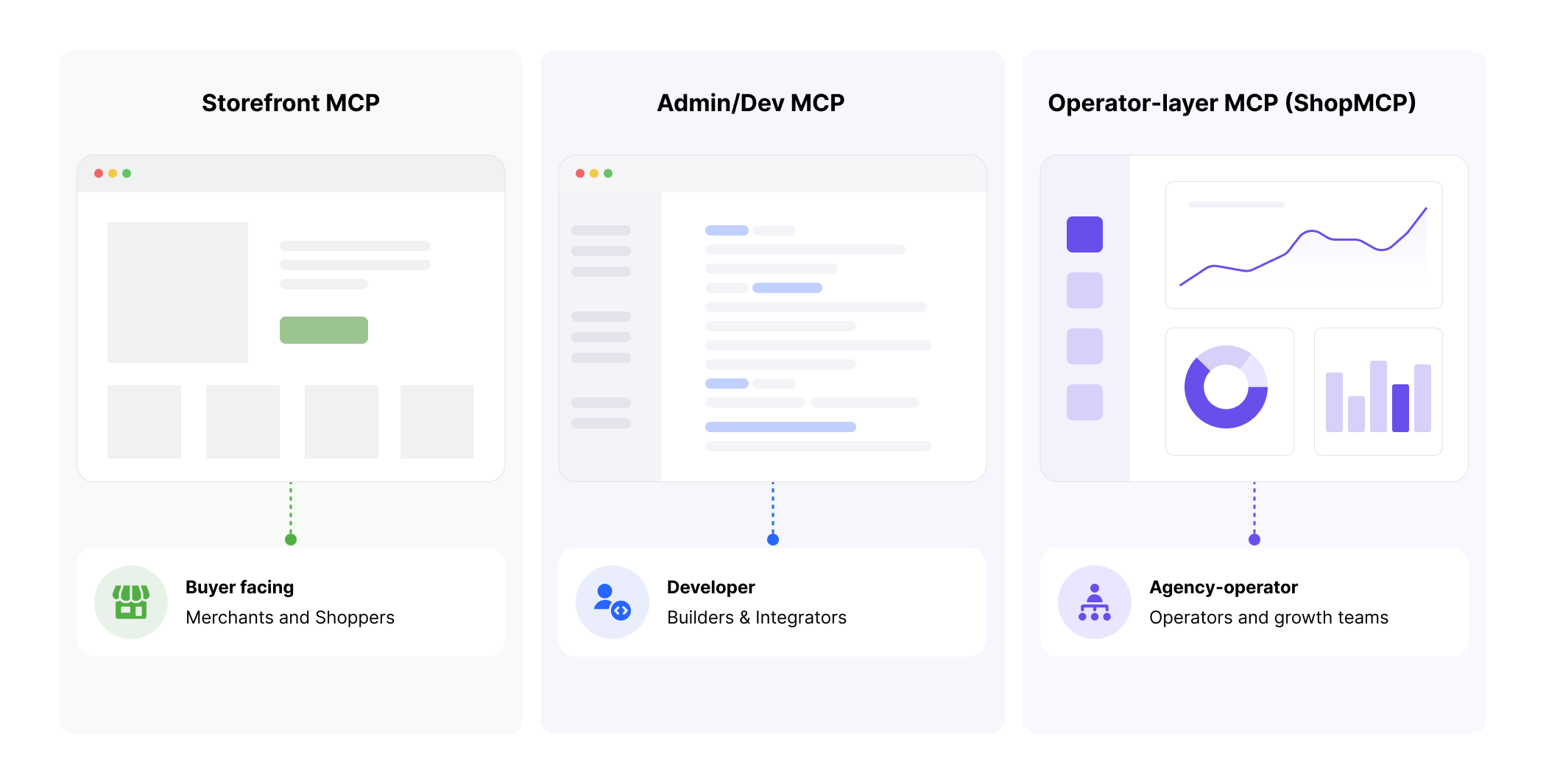
Shopify Storefront MCP
Built for: Shopify itself, surfacing storefront data to shoppers and conversational commerce. Documented at shopify.dev.
What it does: Lets an AI assistant — typically embedded in a customer-facing experience — search your catalog, look up product details, surface recommendations, and check stock. Think of it as the API behind "AI shopping assistants" that retailers add to their stores.
Who should use it: You're building a chatbot, a conversational commerce layer, or an AI search experience for your shoppers. You're not the operator; you're shipping a feature your customers will see.
Who should not use it: You. Probably. Unless you're explicitly building a customer-facing AI feature, Storefront MCP isn't the tool for ops.
Shopify Admin / Dev MCP
Built for: Developers working on a single Shopify store. The official version lives at shopify.dev; a popular open-source alternative is geli2001/shopify-mcp on GitHub.
What it does: Exposes the Shopify Admin API — products, orders, customers, GraphQL queries — to a developer's AI client. Useful for writing scripts, testing API behavior, building Shopify apps, debugging.
Who should use it: You're a developer with one store you're working on, and you want Cursor or Claude Code to help you write Shopify-specific code or query the Admin API for one-off investigations.
Who should not use it: You're running ten client stores. Single-store, developer-shaped tools don't scale to multi-tenant operator workflows. Authentication-per-store gets painful, switching context between stores gets painful, and the moment you need to cross-reference Shopify data with Klaviyo or Google Ads, you hit a wall the Dev MCP wasn't built to solve.
Operator-and-agency MCP (ShopMCP, and a small handful of similar tools)
Built for: People running ecommerce stores professionally — agency operators, in-house ops teams, technical founders — who need cross-platform unified access, not just Shopify alone.
What it does: Bundles Shopify with the rest of the platforms an operator actually lives in. ShopMCP, for example, gives one MCP connection access to Shopify plus Klaviyo, GA4, Google Ads, Google Search Console, Google Merchant Center, Stripe, WooCommerce, and Neto. Switching between client workspaces is one prompt. Asking "what's wrong this week" across every connected platform is one prompt.
Who should use it: You're the agency operator persona this whole guide is written for, or close to it. You manage multiple stores. You already work in Claude Code, Cursor, ChatGPT, or Slack. You don't want to install seven separate MCP servers and authenticate each one against five different clients — you want one connection that does the job.
Who should not use it: A single-store, single-platform shopper-facing build. Use Storefront MCP. Or a developer wiring up one store for code work. Use Dev MCP.
Side-by-side
| Storefront MCP | Admin / Dev MCP | ShopMCP (operator-layer) | |
| Primary user | Shoppers (via your storefront) | Developers (single store) | Operators / agencies (multi-store, multi-platform) |
| Data scope | Storefront-readable catalog | One Shopify Admin API | Shopify + Klaviyo + GA4 + Google Ads + GSC + GMC + Stripe |
| Multi-store? | n/a | One at a time | First-class |
| Writes? | No | Yes | Yes |
| Auth model | Storefront access tokens | Per-developer Admin tokens | One workspace, OAuth per platform |
| Best in | Customer-facing chat | Cursor/Claude Code dev work | Daily ops, agency workflows, reporting |
If you're not sure which one you want and you're reading this guide, you almost certainly want the third. If your work involves multiple stores or any platform other than Shopify itself, the third is the only one that fits. Read the Storefront vs Admin vs ShopMCP deep-dive for the long form on the disambiguation.
What an operator actually does with Shopify MCP
Forget the abstract. Here's what a Monday looks like with this stack live.
1. The morning dashboard
Before MCP, the morning ritual was: Shopify admin → Klaviyo dashboard → GA4 → Google Ads → maybe Triple Whale → maybe Slack to ping the team. Twenty minutes of clicking before you had a picture of yesterday.
With ShopMCP wired into Claude Desktop, it's one prompt:
Give me the morning dashboard across all my stores. Yesterday's revenue, AOV, top sellers, any inventory at risk, top Klaviyo flows by revenue, Google Ads spend vs ROAS, and anything in GSC that dropped position.
Claude makes the tool calls in parallel — Shopify, Klaviyo, GA4, Google Ads, GSC — and returns a one-screen summary. About 90 seconds, end to end. {SCREENSHOT: Claude Desktop showing the morning dashboard response with structured sections per platform}
Operator playbooks like the 10-minute morning ritual build on this primitive.
2. Multi-store reporting in one prompt
If you run ten clients, "give me a weekly report" used to mean ten dashboards or one heavy data warehouse. With multi-tenant MCP it's:
For each of my client workspaces, pull last week vs the prior week: revenue, orders, AOV, top three SKUs by revenue, top two products by velocity drop. Output as a table I can paste into a Notion page.
Each workspace gets queried in turn. The result is a copy-pasteable summary you actually use. The multi-store reporting playbook walks through how agencies handle 10+ clients this way.
3. The wasted-spend audit
Across my Google Ads accounts, find search terms with > $50 spend in the last 30 days and zero conversions. List campaign, ad group, search term, spend, and suggest negative-keyword candidates.
Used to be an afternoon's work. Now: a prompt and a list. The full 14-day wasted ad spend playbook is in Pillar 2.
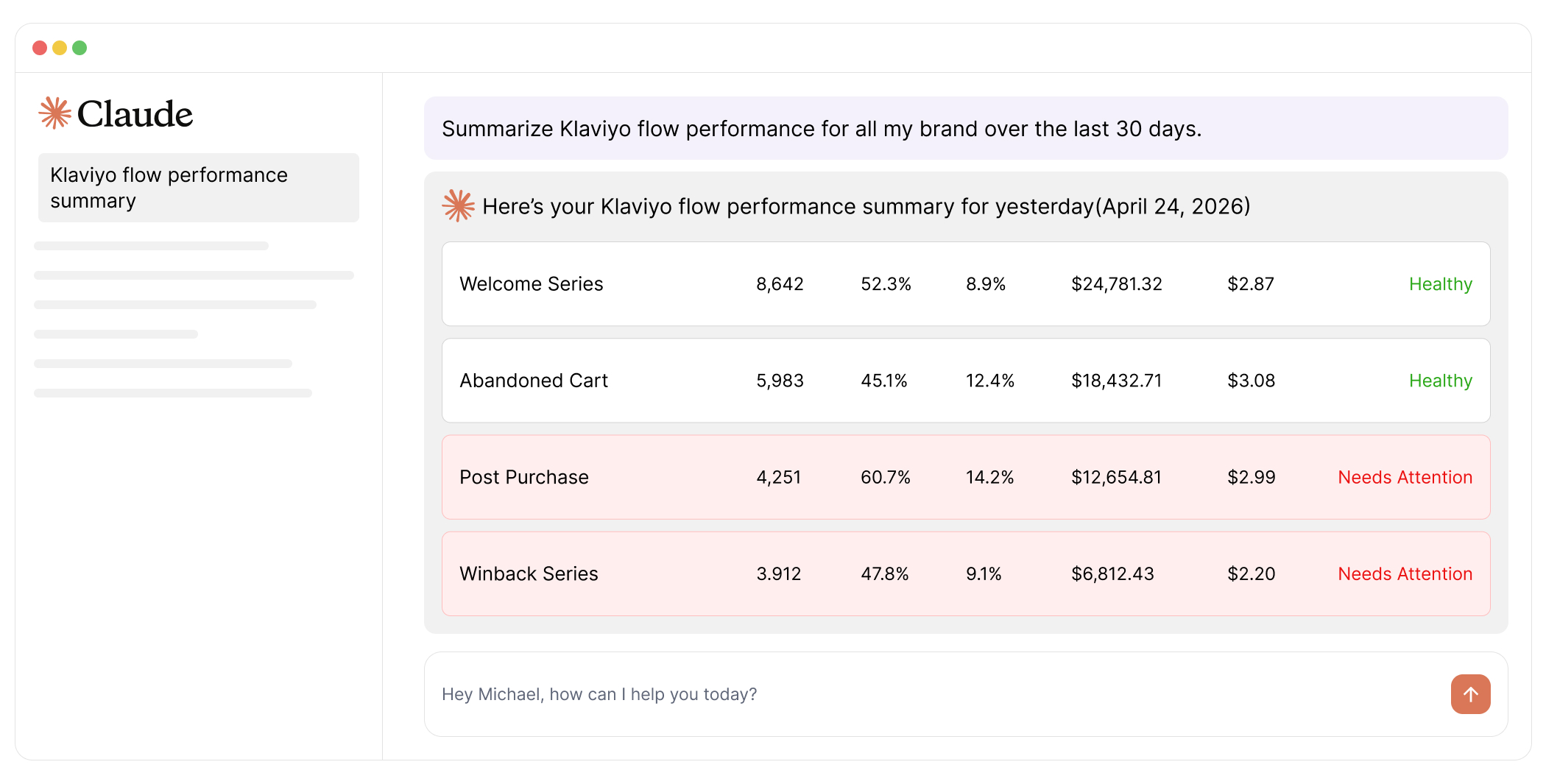
4. The Klaviyo flow audit
Pull all Klaviyo flows for {Brand X}. For each flow, show open rate, click rate, revenue per recipient, and the date of the last edit. Flag any flow with > 60-day-old content and below-account-average revenue.
Catches the abandoned-cart flow that quietly stopped converting because the discount code expired in February. The 30-minute revenue recovery loop covers this in detail.
5. The catalog audit
For my Shopify store, find products where the title is shorter than 30 characters, or the description has fewer than 80 words, or there are fewer than 3 images. Group by product type and show the top 20 problem products by recent revenue.
This is the kind of work that justifies hiring an analyst. With MCP it's a query.
These five workflows — dashboard, multi-store reporting, wasted spend, flow audit, catalog audit — are the operator job. If your daily routine is built around clicking through five tabs to assemble a picture of one number, MCP collapses it into one conversation.
How Shopify MCP works under the hood
For the technically curious, here's the architecture.
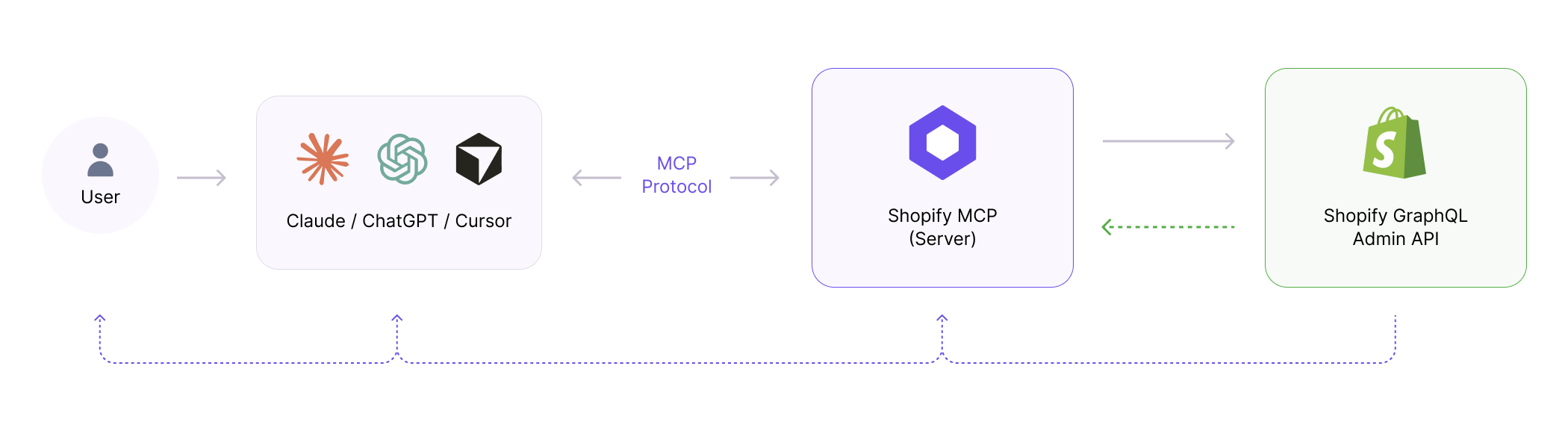
- You type a prompt in Claude Desktop, ChatGPT, or Cursor.
- The AI client parses it, identifies tool calls it can make, and asks the MCP server to execute them.
- The MCP server translates each tool call into the appropriate API call — Shopify GraphQL Admin API, Klaviyo API, GA4 Data API, Google Ads Query Language, etc.
- The upstream API returns data.
- The MCP server structures it into the format the AI client expects.
- The AI client synthesizes the response — natural language, tables, follow-up questions — and shows it to you.
The interesting design decision in an operator-layer MCP server (vs Shopify's own single-platform MCP) is what happens at step 3. ShopMCP doesn't just talk to Shopify; it knows about every platform an operator uses and can route the same prompt across multiple APIs in parallel. The MCP server holds the cross-platform schema; the AI client doesn't have to.
That's why a prompt like "correlate yesterday's drop in revenue with my Klaviyo flow performance and my Google Ads search-term changes" works at all. The MCP server breaks it into three parallel API calls, joins the data, and returns one coherent answer.
Who is Shopify MCP for?
In rough order of who gets the most value, today:
Primary — the agency operator. You own or run senior ops at a Shopify-leaning ecommerce agency. You manage 5-30 client stores. You already live in Claude Code, Cursor, Slack, and Notion. You're technical enough to install an MCP server and impatient enough to abandon any tool that wastes ten minutes. Multi-tenant pain is real for you. ShopMCP-shaped tools turn that pain into a non-event.
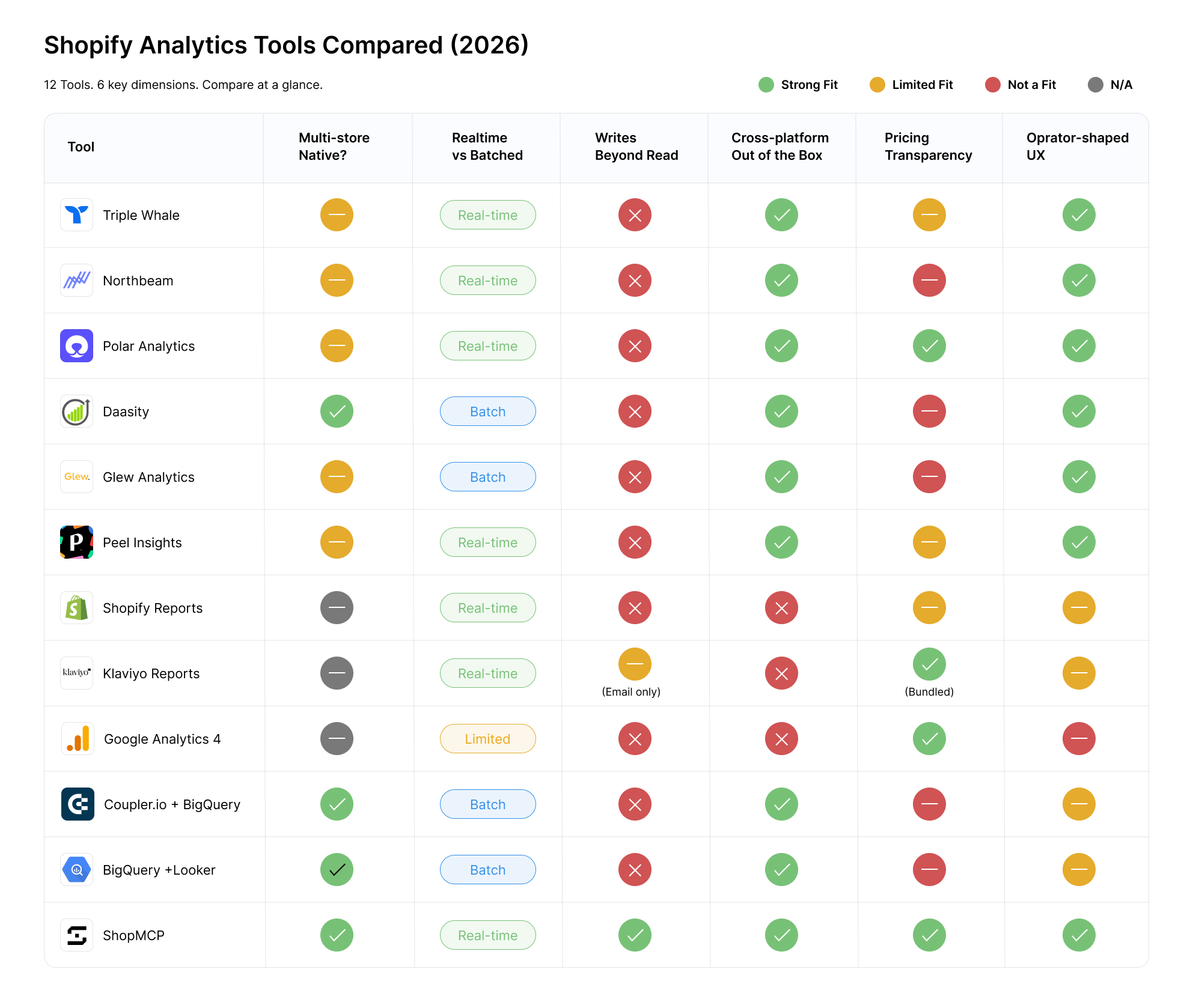
Secondary — in-house ecommerce ops. Head of ecommerce, head of growth, ops lead at a mid-market DTC brand ($5M-$50M ARR). You have a sprawling tool stack — Shopify, Klaviyo, Google Ads, GA4, maybe Triple Whale or Polar. You want answers, not dashboards. You're less technical than the agency persona but you have real budget and longer-term thinking, and the tool replaces a quarterly BI license that nobody on your team actually opens.
Tertiary — the technical solo founder. Indie hacker, ex-engineer, Shopify operator running your own brand. Highest volume, lowest LTV in aggregate, but the source of most build-in-public energy and a lot of the social proof higher-ACV personas need to see before they convert. If that's you, hello — and the Cursor + Shopify integration is going to delight you.
Who it's not for, in 2026: A consumer-facing storefront chatbot. Use Shopify's Storefront MCP for that. A team that doesn't already use Claude, ChatGPT, or Cursor in some form — you'd be paying for an integration to a workflow you haven't adopted yet. Start with the AI client first.
What Shopify MCP doesn't do (in 2026)
Honest framing matters more than hype here, especially because the rest of this category is going to overpromise.
It is not a customer-facing chatbot. Shopify MCP is for the people running the store, not the people shopping it. (For shopper-facing chat, you want Storefront MCP, an embedded conversational layer, or a dedicated chat product.)
It does not build your storefront. It edits products, prices, and inventory; it does not design your theme or your checkout. Shopify Magic and Liquid live in their own world.
It is not magic. If your data in Shopify, Klaviyo, or GA4 is wrong — broken UTMs, missed conversion tags, a Klaviyo list that hasn't been pruned in two years — the AI will faithfully read the broken data and give you confidently broken answers. Garbage-in-garbage-out applies. Tools like the free Shopify health check catch the obvious instrumentation problems first.
Security considerations. A handful of MCP servers in 2025 had well-publicized prompt-injection vulnerabilities — researchers showed that a malicious product description or order-note could induce an AI client to leak data or trigger unintended writes. Hosted operator-layer MCPs like ShopMCP isolate writes behind explicit confirmation prompts and run input sanitization on data fetched from connected platforms; OSS MCP servers vary in their hardening. If you're auditing an MCP server before adopting it, two questions worth asking: how does it handle untrusted content in API responses, and what writes happen without explicit human confirmation. Both should have clear answers.
It does not replace your fulfillment, your warehouse software, or your accounting. It can read from Stripe and tell you what's reconciled; it doesn't post journal entries. Use the right tool for the job.
The honest framing for 2026: Shopify MCP collapses the daily-ops cycle from twenty browser tabs to one conversation. That's enough. It will get bigger.
Getting started in 10 minutes
Three paths, depending on which AI client you already use:
- Connect Claude to your Shopify store with MCP — the most common path. Claude Desktop has the most polished MCP tooling; ten minutes from cold install to first prompt.
- Connect Shopify to ChatGPT in 5 minutes — for ChatGPT users on plans that support MCP servers. The setup is shorter; the trade-offs are different.
- Shopify MCP for Cursor — for the developer-leaning indie hacker crowd. Combines code work with store data in one IDE.
Once you're connected, the 50 prompts that actually work is a fast way to find which workflows matter to you in week one.
The bigger picture
If you've been doing ecommerce ops for any length of time, you've watched the dashboards keep multiplying. Every new platform ships its own — and your team ends up with twelve open tabs and a half-finished Notion doc that pretends to summarize them.
Shopify MCP doesn't fix that by adding a thirteenth dashboard. It fixes it by making the dashboards optional. The data is still there; the platforms are still there; you just stop clicking through them. You ask the question; the AI assembles the answer; the next question follows naturally from what you saw.
For agencies running multiple clients, that's a 4-hour weekly report becoming a 10-minute Claude conversation. For in-house ops teams, that's the ability to answer the CEO's "why are we down this week?" in real time instead of in tomorrow's standup. For solo founders, that's the difference between feeling like you have a co-founder and feeling like you don't.
We think this is what the operator's tool stack looks like by 2027 — and we're building for the operator who got there a year early.
Install ShopMCP → · Read the docs → · See the 90-day capstone →
Frequently asked questions
What is Shopify MCP?
Shopify MCP is a Model Context Protocol implementation that connects Shopify stores to AI assistants like Claude, ChatGPT, and Cursor. It lets you query, edit, and operate your store using plain-English instructions instead of dashboards.
Is Shopify MCP free?
Shopify's own MCP endpoints (Storefront MCP, Dev MCP) are free. Operator-layer MCP servers like ShopMCP are paid products with a free trial — they unify Shopify with Klaviyo, GA4, Google Ads, GSC, Stripe, and Google Merchant Center in one connection.
What is the difference between Shopify Storefront MCP, Admin MCP, and ShopMCP?
Storefront MCP is built for shopper-facing experiences (search, conversational commerce). Admin / Dev MCP is built for developers working on a single Shopify store. ShopMCP is built for operators and agencies running multiple stores who need Shopify, Klaviyo, GA4, Google Ads, GSC, and Stripe data unified behind one MCP connection.
How do I connect Shopify to Claude?
Install ShopMCP, copy the connection string from your dashboard, paste it into Claude Desktop's MCP settings, and authenticate your Shopify store. The whole process takes under 10 minutes. Step-by-step: Connect Claude to your Shopify store.
Who is Shopify MCP for?
Primarily ecommerce agency operators running 5-30 client stores who already work in Claude Code, Cursor, or Slack. Secondarily in-house ecommerce ops at mid-market DTC brands. Tertiarily technical solo founders who want a faster way to query their store than the Shopify admin UI.
Can ChatGPT access Shopify?
Yes — through MCP. ChatGPT (paid plans) supports MCP servers as of 2026. Connect ShopMCP, authenticate your store, and you can ask ChatGPT questions about your sales, customers, inventory, and ad spend in plain English. Step-by-step.
What can Shopify MCP not do?
Shopify MCP isn't a customer-facing chatbot for your storefront, isn't a Shopify theme builder, and isn't a replacement for your fulfillment or warehouse software. It's a data-and-action layer for the people running the store, not the people shopping it.
More Articles
Your coffee's still warm. Your Monday review is done.
Connect one platform in 5 minutes. Run your first playbook before the kettle boils.


2026 Copyright © ShopMCP. All rights reserved. A Perceptiv Digital initiative.