
Prompts
How to Ask AI Questions About Your Shopify Store: 50 Prompts That Work
Date
June 12, 2026
Author
Igor Cerjan
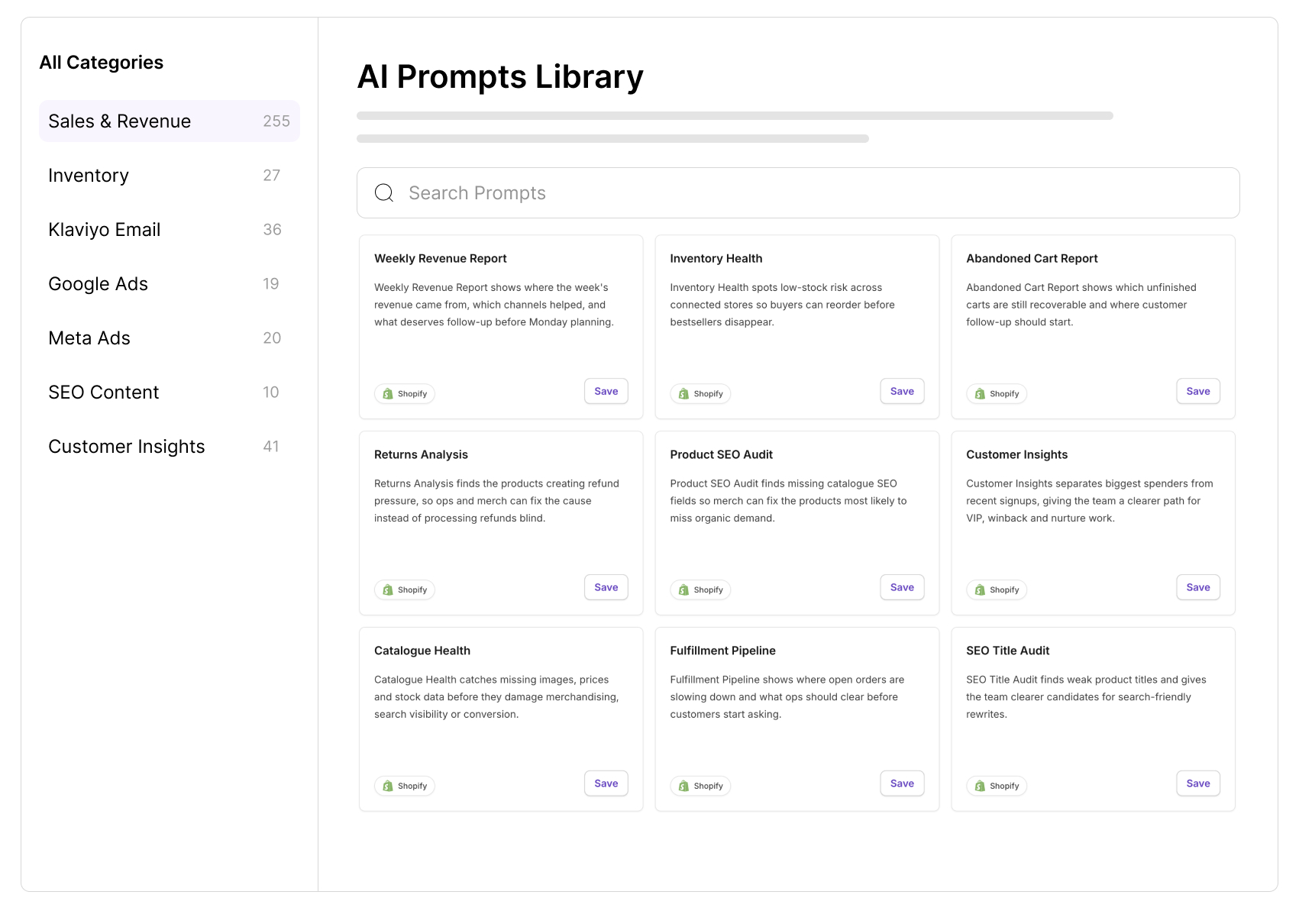
This is the operator's prompt library — 50 prompts ecommerce teams actually use, every week, in Claude or ChatGPT with ShopMCP connected. Copy them. Adapt them. Build your own from the patterns underneath.
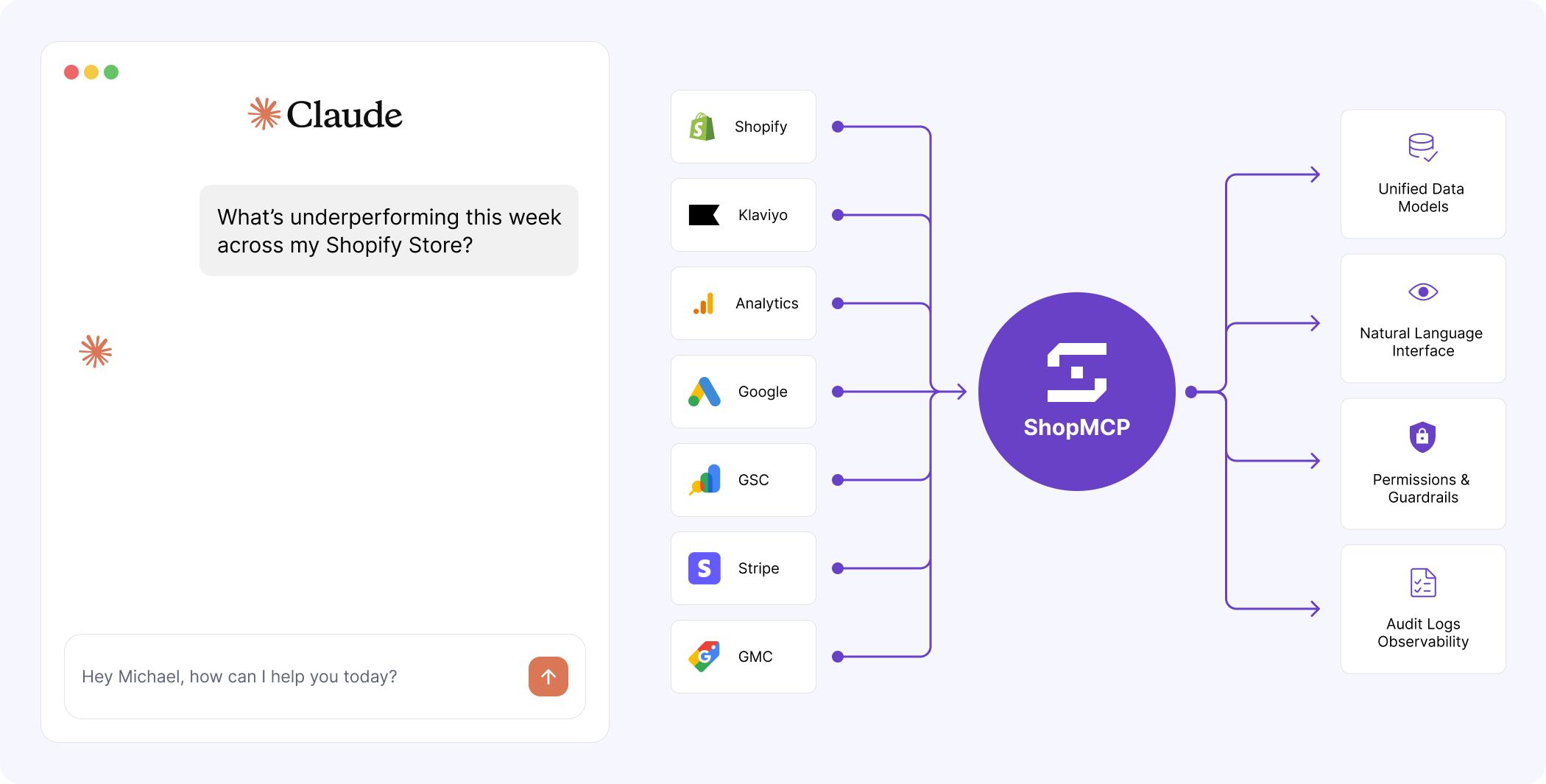
Each prompt assumes you have ShopMCP wired into your AI client (see Connect Claude to your Shopify store or the ChatGPT version), and that the relevant platform (Shopify, Klaviyo, Google Ads, GA4, GSC) is connected in your dashboard.
The prompts are grouped by job. Skip to whichever section matches your week.
How these prompts work
Every prompt in this list is built from the same three ingredients: specific scope (which store, which date range), a clear output format (table, paragraph, ranked list), and proposal-first writes (the AI suggests; you confirm before changes happen).
Vague prompts produce vague answers. "How are my flows doing?" is bad. "Summarize Klaviyo flow performance for {Brand X} last 30 days; flag flows below account average for revenue per recipient; output as a table I can paste into Slack" is good.
Adapt every prompt to your own brand names, date ranges, and stores.
Sales & revenue (10)
1. Yesterday's revenue across stores
"Summarize yesterday's revenue across all my Shopify stores. Per store, show: revenue, orders, AOV, top three products by revenue. Output as a table."
2. Week-over-week revenue
"Compare last 7 days revenue vs the prior 7 days for {Brand X}. Show daily values, percent change, and flag any day with > 25% deviation from the trailing 4-week average."
3. Top sellers this month
"Top 10 products by revenue this calendar month for {Brand X}. Include units sold, revenue, AOV, and average days-of-stock at current velocity."
4. New-customer vs repeat revenue
"For {Brand X} last 90 days, split revenue into new-customer revenue and returning-customer revenue. Show the trend by week and the new-vs-returning ratio."
5. Discount-code attribution
"List the top 10 discount codes for {Brand X} by total discounted revenue last 30 days. Show code, uses, total revenue, total discount given, and net revenue after discount."
6. AOV trend
"AOV trend for {Brand X} last 12 weeks, weekly. Identify any weeks with statistically meaningful deviation. What was different about those weeks?"
7. Refund and chargeback rate
"Refund + chargeback rate for {Brand X} last 90 days as a percent of revenue. Compare to the prior 90 days. List the top 5 SKUs driving refunds."
8. Subscription-revenue diagnostic (subscription brands)
"For {Brand X}, last-90-day subscription metrics: active subscriptions, churned, new starts, MRR delta. Compare to prior 90 days. Flag concerning trends."
9. Best-customer cohort snapshot
"Identify the top 100 customers for {Brand X} by lifetime value. Show their first-order date, total orders, total revenue, last-order date, and which products they buy repeatedly."
10. Revenue per session (when paired with GA4)
"Revenue per session for {Brand X} last 30 days, broken down by traffic source. Include sessions, revenue, conversion rate, and revenue per session for each source."
Inventory & catalog (10)
11. Low-stock list
"Find SKUs at {Brand X} with under 14 days of stock at current velocity. Show product, current stock, daily velocity, days-of-stock, and recommend order quantity to reach 60 days. Don't make changes."
12. Overstock list
"Find SKUs at {Brand X} with > 90 days of stock at current velocity. Group by product type, show inventory value tied up, and recommend top candidates for clearance promotion."
13. Catalog content audit
"Audit my Shopify catalog. Find products with title under 30 characters, description under 80 words, or fewer than 3 images. Group by recent revenue. Show the top 20 problem products."
14. SKU velocity changes
"For {Brand X}, find SKUs whose 30-day velocity dropped > 50% vs the prior 30 days. Show product, prior velocity, current velocity, and any inventory changes that might explain it."
15. Product launch recap
"Summarize the launch performance of products created in the last 30 days at {Brand X}: units sold, revenue, returns, and how each compares to the average launch."
16. Variant-level inventory
"For {Brand X}'s top 20 products by revenue, show variant-level inventory and flag any variant with < 7 days of stock or > 120 days of stock."
17. Bundle effectiveness
"If {Brand X} has bundles, show bundle revenue vs individual-product revenue last 30 days, and which bundles are pulling weight."
18. Reorder candidates
"Recommend top 20 SKUs to reorder this week at {Brand X} based on velocity, current stock, lead time, and recent sell-through. Output as a paste-ready PO draft."
19. Inventory-tied-up snapshot
"Total inventory value tied up at {Brand X} right now. Break down by product type. Compare to 30 days ago and 90 days ago."
20. Out-of-stock impact
"Find products at {Brand X} that have been out of stock at any point in the last 30 days. Estimate revenue impact based on velocity at last-in-stock."
Marketing & email — Klaviyo (10)
21. Flow audit
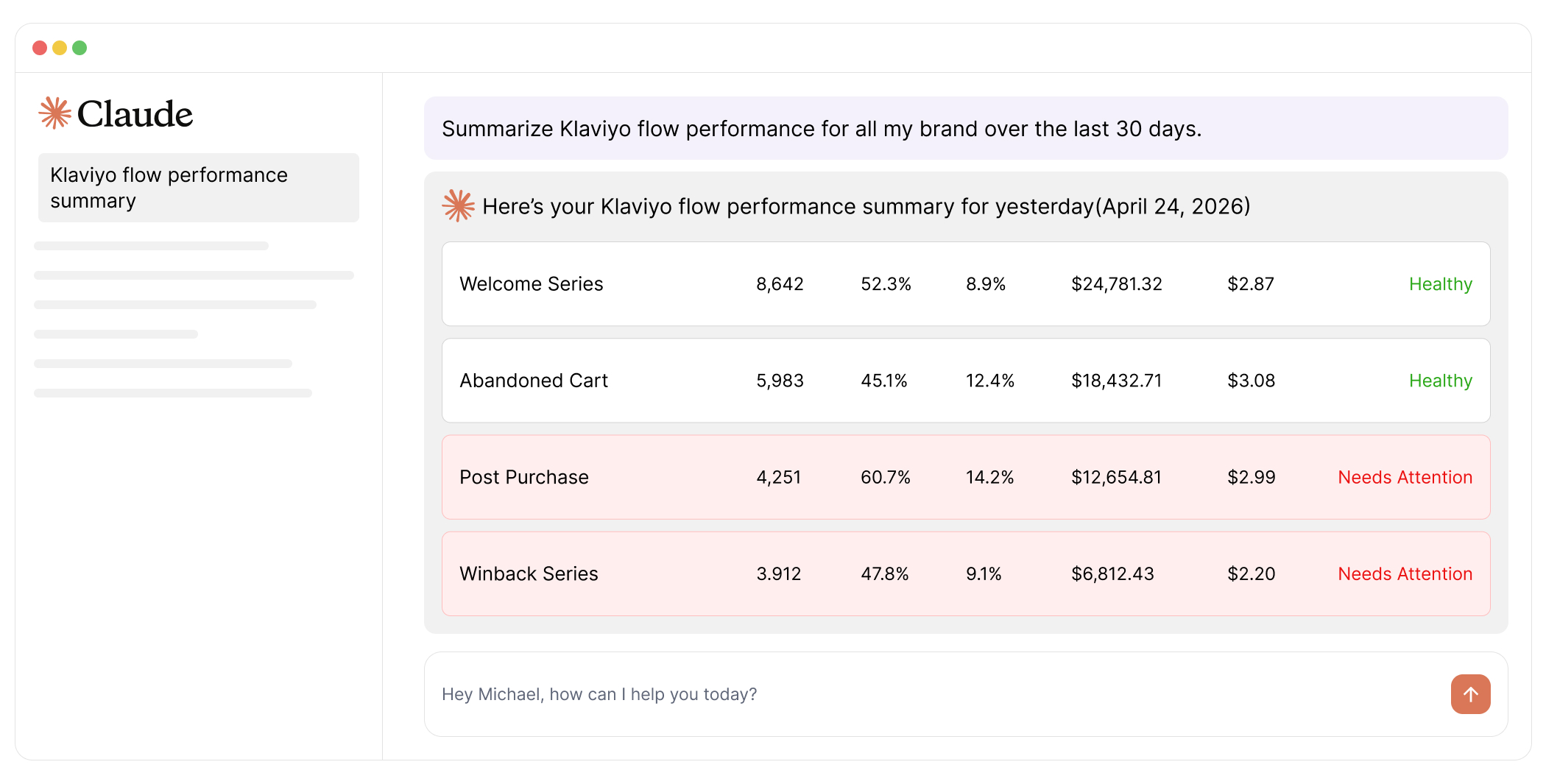
"Klaviyo flow performance for {Brand X} last 30 days. Show flow, send volume, open rate, click rate, revenue, RPR, last edit date. Flag flows > 60 days unedited and below account-average RPR."
22. Campaign top performers
"Top 10 Klaviyo campaigns for {Brand X} by revenue last 30 days. Show subject, send size, open rate, click rate, revenue, RPR. What was different about the top three?"
23. List growth diagnostic
"Klaviyo list growth for {Brand X} last 90 days, weekly: new subscribers, unsubscribes, net growth. Flag accelerating, decelerating, or flat trend."
24. Inactive segment cleanup
"Find Klaviyo segments at {Brand X} with engagement below 5% in last 90 days. Show segment, size, last-sent date, recent revenue contribution. Recommend pruning order."
25. Welcome flow drift
"Has {Brand X}'s welcome flow open rate or revenue per recipient drifted in the last 90 days? Show weekly trend, compare to the trailing baseline, identify the inflection."
26. Abandoned-cart flow audit
"Audit {Brand X}'s abandoned cart and abandoned checkout flows. Show recent performance, recent edits, and any obvious problems (broken links, expired discount codes, missing variants)."
27. Suppression analysis
"Klaviyo suppression list for {Brand X} — total suppressed, growth in last 30 days, breakdown by suppression reason."
28. Segment-vs-list performance
"For {Brand X}'s last 5 campaigns, did segmented sends outperform broadcast sends? Show RPR comparison."
29. Best-send-time test
"For {Brand X} last 90 days, what day of week and hour drives the highest revenue-per-recipient on broadcast campaigns?"
30. Predictive-revenue check
"Klaviyo predictive metrics for {Brand X} top customers — show high-CLV predictions, churn-risk predictions, and how those have shifted in last 30 days."
Paid ads — Google Ads + GMC (10)
31. Wasted spend audit
"Across my Google Ads accounts, find search terms with > $50 spend and zero conversions in the last 30 days. Recommend negative keywords. List campaign, ad group, search term, and proposed negative."
32. Top-ROAS campaigns
"Top 10 Google Ads campaigns by ROAS last 30 days for {Brand X}. Show spend, revenue, ROAS, and trend vs prior 30 days."
33. Quality Score audit
"Identify Google Ads keywords for {Brand X} with Quality Score below 5 and meaningful spend (> $200). Show keyword, QS, expected CTR rating, ad relevance rating, landing-page-experience rating."
34. Performance Max diagnostic
"For {Brand X}'s Performance Max campaigns last 30 days: spend, revenue, ROAS, asset-group performance, and which audience signals are pulling weight."
35. Search-term audit
"Top 50 search terms triggering ads for {Brand X} last 30 days, by spend. Flag any that look misaligned with the campaign's theme."
36. Ad-creative performance
"Top 10 ads for {Brand X} last 30 days by ROAS. Show ad copy, image (or video), CTR, conversion rate, and revenue."
37. GMC product-issue summary
"Google Merchant Center product issues for {Brand X}: how many disapproved, how many warning, top 5 issue types, and recommended fix order."
38. Price competitiveness
"GMC price-competitiveness data for {Brand X}'s top 50 products by revenue. Flag any priced > 15% above category benchmark."
39. Shopping-vs-search split
"{Brand X} Google Ads spend and revenue split between Shopping and Search campaigns last 30 days. Which is pulling more weight per dollar?"
40. Bidding-strategy diagnostic
"For {Brand X} Google Ads, list current bidding strategies per campaign with ROAS, conversion volume, and a recommendation if a campaign should consider switching."
SEO & search — GSC (5)
41. Top-pages performance
"Google Search Console top 20 pages for {Brand X} last 28 days: clicks, impressions, CTR, avg position. Flag pages with > 10K impressions and CTR below 2%."
42. Quick-win keywords
"GSC keywords for {Brand X} ranking position 5-15 with > 100 monthly impressions. Show keyword, page, current position, impressions, CTR. These are the easiest wins."
43. Decay detection
"GSC pages for {Brand X} where clicks have dropped > 30% in the last 28 days vs prior 28 days. Show page, prior clicks, current clicks, and recent rank trajectory."
44. New-page indexing status
"Pages added to {Brand X} in the last 30 days — show GSC indexing status (indexed, discovered-not-indexed, submitted-not-indexed) and total impressions per page."
45. Branded vs non-branded split
"{Brand X} GSC last 90 days, split into branded vs non-branded queries. Show clicks, impressions, CTR for each. Trend by week."
Cross-platform diagnostics (5)
46. The big "why are we down" prompt
"{Brand X} revenue last week dropped 18% vs the prior week. Pull data from Shopify, Klaviyo, Google Ads, GA4, and GSC. What's the most likely driver? Show the supporting data for your hypothesis."
47. Channel-correlation snapshot
"Last 30 days for {Brand X}: correlate daily revenue with daily Klaviyo email volume, daily Google Ads spend, and daily organic clicks (GSC). Which channel's swings track most closely with revenue?"
48. New-customer-cohort source
"Where did {Brand X}'s new customers come from in the last 30 days? Pull the breakdown across Klaviyo source attribution, GA4 source/medium, and Shopify referrer where available."
49. ROAS reality check
"{Brand X} blended ROAS calculation: total revenue last 30 days vs total ad spend across Google Ads (and any other connected ad platform). Compare to prior 30 days. Flag the trend."
50. Margin-aware ROAS
"Same as #49 but adjust revenue for product COGS (use {Brand X}'s margin assumption of {X}%). What's the margin-aware ROAS, and which campaigns flip from profitable to unprofitable when you account for margin?"
Pre-publish note: every prompt should be tested before you ship a library
A practical caveat that's easy to skip: if you adopt this library wholesale into your team's Notion, test every prompt at least once against a real workspace before relying on it. ShopMCP's tool surface evolves as platforms add features, and prompts that worked in v1 might need a parameter tweak in v2. The diagnostic prompts (especially #46-50) are the most sensitive to schema changes upstream.
A reasonable adoption pattern: import all 50 prompts into your Notion library tagged "untested", run each one against a sample workspace as you have a moment that week, mark them "verified" once the output looks right, and only then promote them to your team-wide library. Twenty minutes of one-time validation pays back the first time a prompt would otherwise ship a bad answer to a client.
How to extend this library
Three rules for adding your own:
- Specificity > brevity. Name the brand, the date range, the output format. The 50 above are written verbosely on purpose.
- Proposal-first for writes. When the prompt would change something — inventory, prices, segments — ask for a proposal first. Approve, then apply.
- Compose, don't reinvent. Most new prompts are existing prompts plus one new constraint. Save the base; clone and modify.
For the searchable, copy-paste version of this library plus another 150 prompts, see the ShopMCP prompt library tool when it ships in Wk12.
Frequently asked questions
Do these AI prompts work without ShopMCP? Most assume a connected MCP layer because that's what makes the AI's tool calls actually hit your data. Without an MCP server, you'd have to paste data into the prompt manually each time — possible but not scalable. With ShopMCP or another MCP server connected, the same prompts query live data automatically.
Can these prompts be saved or shared with my team? Yes. Most agencies and ops teams keep a Notion-based prompt library where prompts are versioned and team-searchable. Treat the library like an engineering team treats build scripts — it's a shared owned asset that compounds over time. The full ShopMCP prompt library tool lives at shop-mcp.app/tools/prompt-library.
How do I write good Shopify AI prompts? Three rules: be specific about the date range and scope (which store, which time window), name the output format (table, paragraph, bullet list), and ask for proposals before changes when writes are involved. Vague prompts produce vague answers — the prompts in this library are deliberately specific so you can copy and adapt.
More Articles
Your coffee's still warm. Your Monday review is done.
Connect one platform in 5 minutes. Run your first playbook before the kettle boils.


2026 Copyright © ShopMCP. All rights reserved. A Perceptiv Digital initiative.