
Agencies
AI for Ecommerce Agencies: The Operator Stack for 2026
Date
June 09, 2026
Author
Igor Cerjan
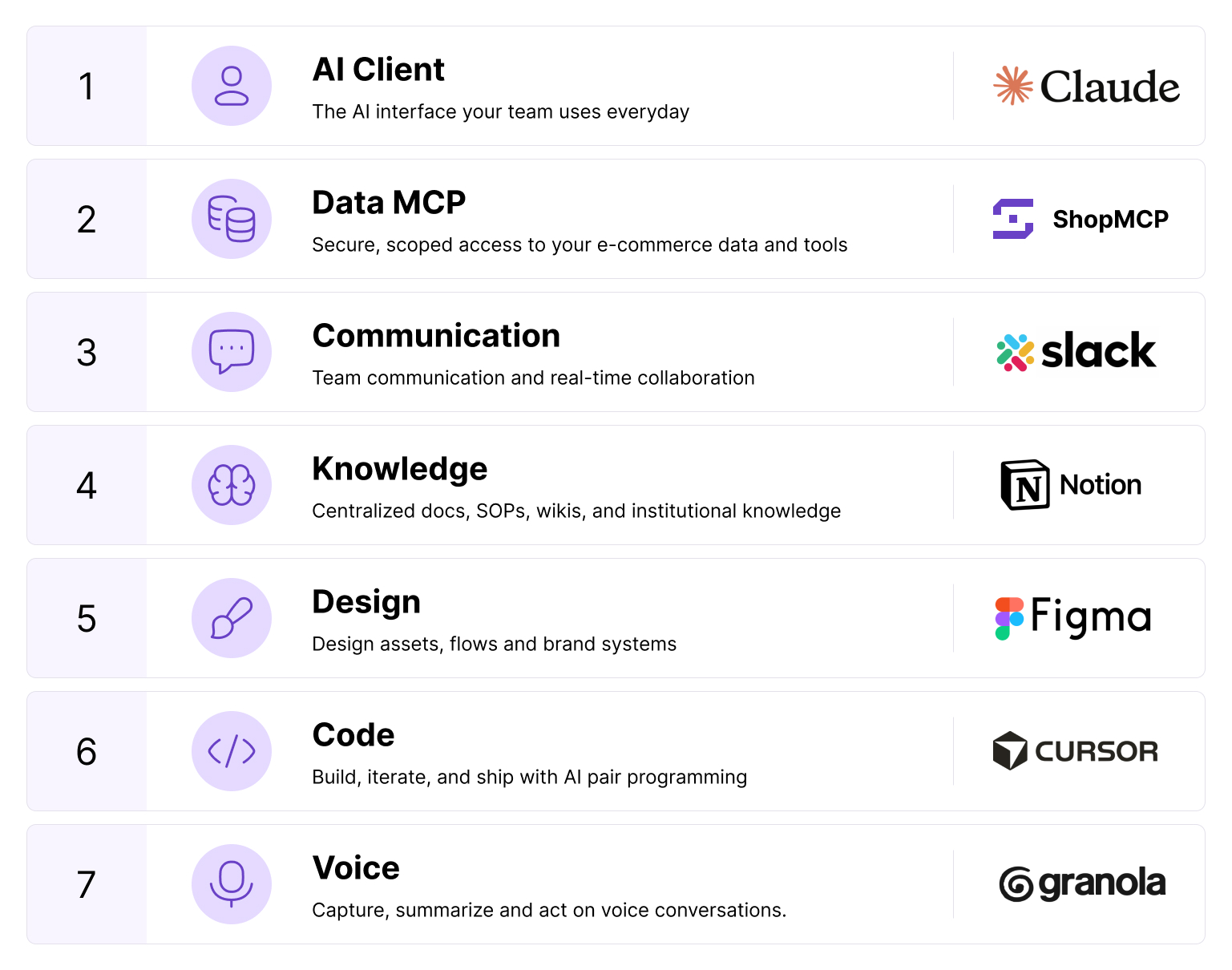
The AI stack for ecommerce agencies in 2026 has seven layers: an AI client (Claude, ChatGPT, or Cursor), an operator-layer MCP server (ShopMCP) for cross-platform data access, Slack with AI integrations, Notion with AI search, Cursor for code work, Figma for AI-assisted design variants, and a meeting-capture layer like Granola or Fireflies. The layers don't change much from agency to agency. The workflows wrapping them do.
This post is for the agency operator running 5-30 client stores who keeps reading "AI for ecommerce" content written for DTC brands and finding none of it fits. AI for agencies is a different problem. The buyer is multi-tenant. The outputs are client-facing. The unit economics live or die on hours-per-client.
We'll cover the seven-layer stack, the four workflows where AI saves an agency 8-12 hours per senior operator per week, what the stack doesn't do, and a 30-day rollout plan for getting from where you are now to where this article describes.
Why agency operators need a different AI stack than DTC brands
DTC content about AI for ecommerce is mostly about a single brand: how do I, as the ops lead at one DTC company, use AI to grow my brand. Helpful. Wrong shape for the agency operator.
The agency operator is multi-tenant by default. If you run 10 client stores, every tool that authenticates one account at a time is friction. Every dashboard built around "your" brand is friction. Every workflow that assumes a single Klaviyo account, a single Google Ads account, a single GA4 property is friction.
The agency operator is also output-shaped, not exploration-shaped. Your AI-generated insight has to leave the AI tool — into a Notion doc, a client Slack channel, a deck, a recurring report. AI tools that don't compose with the rest of your stack waste hours moving things by hand.
The seven-layer stack below is built around those two realities: multi-tenant access and clean composition with the agency's existing tools.
The 7-layer agency AI stack
Layer 1 — AI client
The job: the place you actually type prompts. Where reasoning happens. Where outputs get composed.
The picks (in 2026):
- Claude Desktop — most polished MCP tooling, strong long-tool-call reliability, the default for most operators in our closed beta.
- Claude Code — better when work blends prompts with file edits and shell commands. Cursor-adjacent in feel.
- ChatGPT (Plus/Pro/Team/Enterprise) — strong general reasoning, native MCP connector support on paid plans, the right pick if your team already lives in ChatGPT.
- Cursor — IDE-first; the right pick when AI work and code work blend (Layer 6).
Don't overthink layer 1. Most agencies pick one client per operator based on existing habit and don't switch. The layers below are what compound.
Layer 2 — operator-layer MCP (the data backbone)
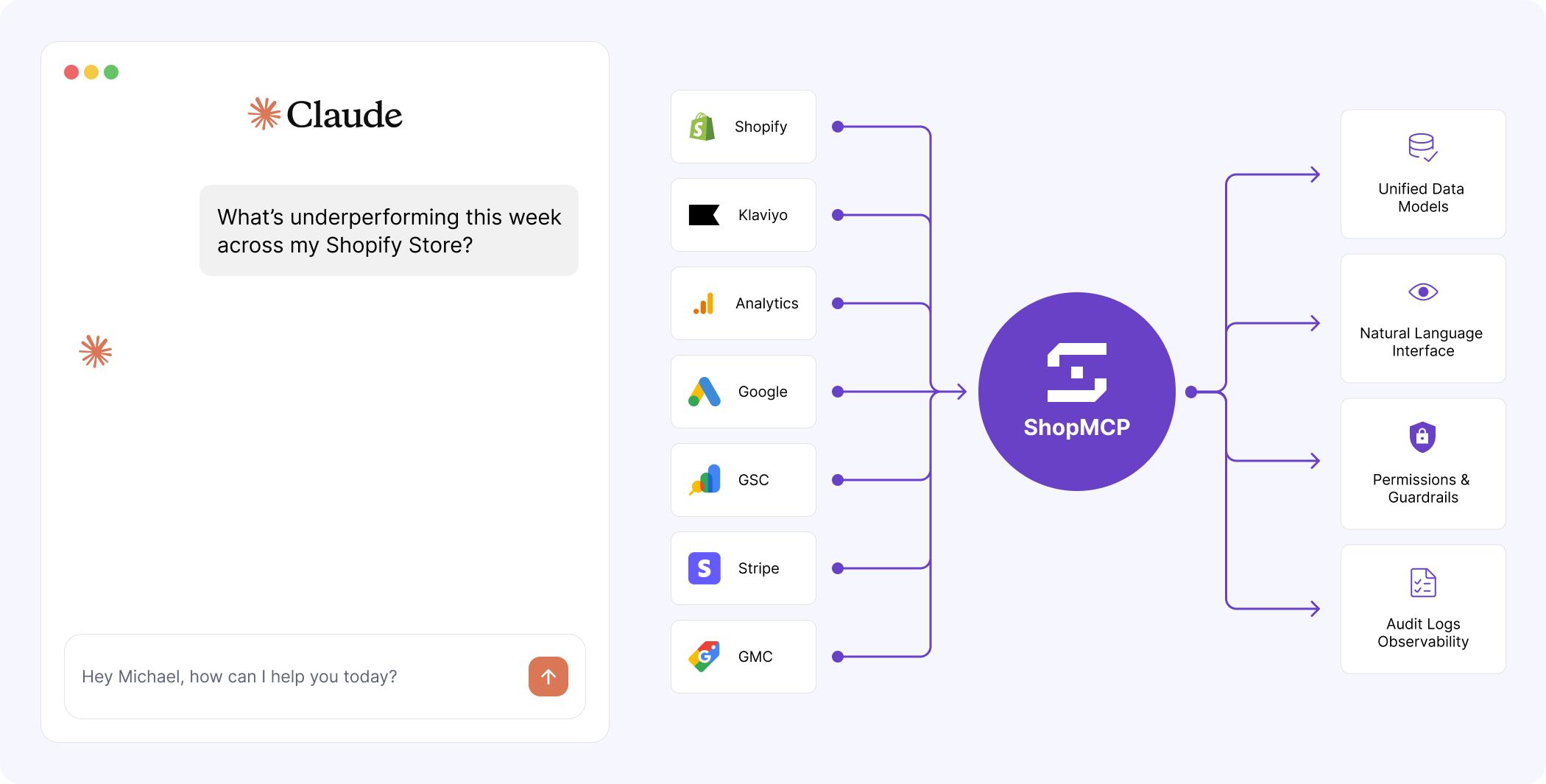
The job: give the AI client read-and-write access to every platform a client store touches. Multi-tenant. Cross-platform. Hosted.
The pick: ShopMCP — bundles Shopify, Klaviyo, GA4, Google Ads, GSC, Stripe, Google Merchant Center, WooCommerce, Neto behind one MCP connection per workspace. Workspace-per-client; switching is one prompt.
Why this layer is load-bearing: without it, every prompt is constrained to whatever data you've manually pasted into the chat. That works for 30 minutes; it doesn't work as a daily operating model. Operator-layer MCP is what makes the rest of the stack genuinely AI-native instead of AI-themed.
For the disambiguation between operator-layer MCP, Storefront MCP, and Dev MCP, see Shopify MCP vs Storefront MCP.
Layer 3 — communication (Slack + AI assistant integrations)
The job: distribution and async collaboration. Where AI-generated outputs become team-visible.
The picks:
- Slack as the substrate — it's already where agency teams talk.
- AI assistant integrations — workflow that fires `/morning-summary` for each client into a per-client channel, sends the AI-generated audit findings into the right Slack thread, surfaces alerts when an MCP-driven monitor flags something.
- Slack threads as ephemeral knowledge — most outputs land here first; the curated subset gets promoted to Notion (Layer 4).
Don't build a custom Slack bot in 2026 unless you have a specific reason. The off-the-shelf Slack ↔ Claude/ChatGPT integrations cover 90% of what agencies actually need.
Layer 4 — knowledge management (Notion + AI search)
The job: durable knowledge. Client onboarding docs, brand-specific SOPs, the agency playbook, the prompt library that compounds over time.
The picks:
- Notion with its built-in AI search — the canonical place for anything that should outlive a Slack thread.
- Per-client workspaces in Notion that mirror your ShopMCP workspace structure — keeps mental models aligned.
- A prompt library that lives in Notion, gets versioned, and is searchable from Slack. Treat your prompts the way good engineering teams treat their build scripts: as a shared, owned asset.
The agencies that get the most value from this stack are the ones who treat the Notion prompt library as a first-class agency asset — when a senior operator finds a prompt that earns 3 hours of value, it goes in the library that day. Not later.
Layer 5 — design and creative (Figma + AI variants)
The job: ad-creative variants, landing-page mockups, lifecycle-email design at scale.
The picks:
- Figma as the canonical design surface.
- Figma AI for variant generation (text, color, layout) at scale.
- Image-generation tools (mid-2026 the field changes quarterly — pick what your designers prefer) for ad creative.
This layer mostly affects creative agencies; ops-leaning agencies use it less. If you're running creative for clients, the AI savings here are real but require a designer to drive — not the same operator who runs Layer 2.
Two practical patterns we see working: (1) variant-grid-then-prune — generate 16 variants, designer cuts to the keepable 3-4, then refines those by hand; (2) brief-then-render — designer writes a tighter creative brief in plain English, AI renders the first 3 attempts, designer iterates from the closest. Both flow naturally from existing creative-team workflows. What doesn't work: asking AI to "design an ad" with no human direction. The output is generic and the rejection-rate burns hours.
This is also the layer where the field changes most. Tooling that was best-in-class in Q1 may not be by Q4. Designers should expect to re-evaluate their image-generation tool every quarter or two; the rest of the stack is more durable.
Layer 6 — code and automation (Cursor + Claude Code + GitHub)
The job: custom Shopify development, theme work, Liquid edits, integration scripts, the one-off automations that aren't worth a no-code tool.
The picks:
- Cursor for IDE-driven Shopify development.
- Claude Code for terminal-driven work and file-aware automation.
- GitHub as version control and review surface.
- Claude or GPT integration in your CI for AI-assisted PR reviews on theme changes (catch the broken Liquid before it ships to a client store).
Most agencies don't have full-time engineers; this layer is for the senior ops people who'd otherwise grind through Liquid templates by hand. Three hours per week saved here is realistic for a single-store senior operator handling occasional theme tweaks; agencies with deeper code work (custom Shopify apps, headless storefronts) see significantly more. The pattern: AI handles the "I know what I want, getting the syntax right is the friction" work; humans still own architecture and security review.
A specific hygiene rule worth adopting: AI-generated theme code should always go through a PR review with at least one human approver, and ideally an automated linter pass. ShopMCP's own CI uses Claude as a first-pass reviewer flagging obvious issues, then a human approves. The agencies in our beta who tried AI-generated direct-to-production code reverted within two weeks; the ones who kept the PR loop in place stayed.
Layer 7 — voice and meeting capture (Granola or Fireflies)
The job: every client call gets captured, transcribed, summarized, and made searchable.
The picks:
- Granola for in-the-moment notes augmented by an LLM transcript pass.
- Fireflies for full transcript + AI summary if you also need the recording itself for QBRs, training, or compliance.
The compound effect: every client meeting becomes searchable. Six months in, when the client says "didn't we agree to...", you have the answer. AI-summarized action items push to Notion (Layer 4). Operators who adopt this layer rarely give it back.
Two operational notes worth getting right from the start: (1) consent matters — most jurisdictions require call participants to consent to recording; build the disclosure into your standard meeting opening, especially for cross-border calls. (2) transcripts are sensitive data — they capture pricing conversations, internal disagreements, deal-shaping context. Treat them with the same access controls as your CRM. The agencies who lose discipline here on transcript access tend to discover the cost the first time someone leaves and takes a Granola-export with them.
How the stack saves an agency several hours a week (workflow walkthroughs)
Where these numbers come from. The numbers in this section are from the small group of agencies running ShopMCP in our closed beta — not a survey, not a public study. We're naming the source explicitly because "AI saves X hours" content typically isn't. As of mid-2026, our closed beta includes a handful of agencies between 5 and 30 client stores; the headline savings cluster between 8 and 12 hours per senior operator per week, concentrated in the four workflows below. Your mileage will vary, especially if your client mix is creative-heavy (Layer 5 dominates) versus ops-heavy (Layer 2 dominates).
Four workflows account for most of the savings. The pattern holds even when the absolute hours don't.
Workflow 1 — Morning client report (was 4 hr/week → 10 min/day = ~50 min/week)
Before: Monday morning, open ten Shopify admins, ten Klaviyo dashboards, ten Google Ads accounts. Assemble per-client status into a doc. Send. Repeat Tuesday. Four hours of senior operator time per week, gone.
After: Single Claude prompt — "morning summary across all client workspaces: revenue, top sellers, low-stock, Klaviyo flow performance, Google Ads ROAS" — runs cross-platform queries in parallel through ShopMCP, returns one structured summary. Edit + send to Slack: 10 minutes. The full deep-dive is in The morning ecommerce dashboard.
Workflow 2 — Wasted ad spend audit (was 1 day/month per client → 30 min)
Before: Once a month, log into each client's Google Ads, export search-term reports, filter for spend without conversions, format into recommendations. One full day of ops time per client. For 10 clients, that's 10 days per month — a full FTE just for waste audits.
After: Prompt against ShopMCP's `google_ads.wasted_spend` tool: "find search terms with > $50 spend and zero conversions in the last 30 days, propose negative keywords." Review the proposal, approve the negatives. 30 minutes per client. 10 clients = one afternoon. Same outcome. The detailed playbook is in Wasted ad spend audit: 14-day Google Ads playbook.
Workflow 3 — Klaviyo flow audit (was 4 hr/client/quarter → 30 min)
Before: Quarterly Klaviyo health-check meant clicking into every flow, reading the recent edits, comparing performance to the account average, writing up the recommendations.
After: "Audit Klaviyo flows for {Brand X}: flag any with > 60-day-old content below account-average revenue per recipient. Suggest specific updates." Three minutes against ShopMCP's Klaviyo tools, edit the output to client tone, ship. The full playbook is Klaviyo flow audit using AI.
Workflow 4 — Ad creative variants (was 1 day → 2 hr per campaign)
Before: A new ad campaign needed 8-15 creative variants. Designer time per variant: 30-60 minutes. Total: most of a day per campaign.
After: Layer 5's AI variant generation produces the rough cuts; designer reviews, approves the keepers, refines the polish. Same final output, ~2 hours instead of a day.
This one is creative-team dependent — if your agency doesn't run creative, you don't get this saving.
Total math (closed-beta observed range): ops-led agencies in the ShopMCP closed beta have typically reported 8-12 hours/week saved per senior operator across these four workflows. Creative-heavy agencies have reported closer to 15, driven by Layer 5 variant production. We expect the public median to be slightly lower than the beta median — early adopters tend to be the operators most invested in extracting value from new tooling. Plan for the lower half of the range, treat the upper half as upside.
The savings compound the more clients you run, because Layer 2 is multi-tenant — adding client #11 adds maybe 5 minutes to the morning summary, not another full report. Single-store-per-tool stacks scale linearly with clients; the operator-layer stack scales sub-linearly.
The full case-study version of this — with the named agency, the real numbers, and the workflow specifics — is at Case study: How {Agency} saved 12 hours/week with ShopMCP.
What the stack doesn't do (honest framing)
Three things this stack will not solve:
It does not replace strategic judgment. A prompt that says "audit my Klaviyo flows" gets you the data and the candidate fixes. It doesn't tell you which fix matters most for this client given their brand, their last 18 months, the conversation you had with their CMO last Tuesday. Strategy is still your job.
It does not magically make a misaligned agency profitable. If your agency is selling fixed-price retainers against undefined scope, AI saves hours that get absorbed into more scope creep. The hours-saved-per-week story works when your pricing model captures the value (value-based, performance, or hourly with a real rate card). It doesn't fix broken commercials.
It does not replace your team. AI compresses commodity work. If most of what your senior operators do is commodity (status reports, audits, dashboard checks), they will look like they have less to do. Reinvest the time in the high-judgment work clients actually pay for: positioning, creative direction, retention strategy, the conversations.
How to roll it out (phased, 30-day plan)
A clean rollout in four weeks. Don't try to install seven layers in a sprint.
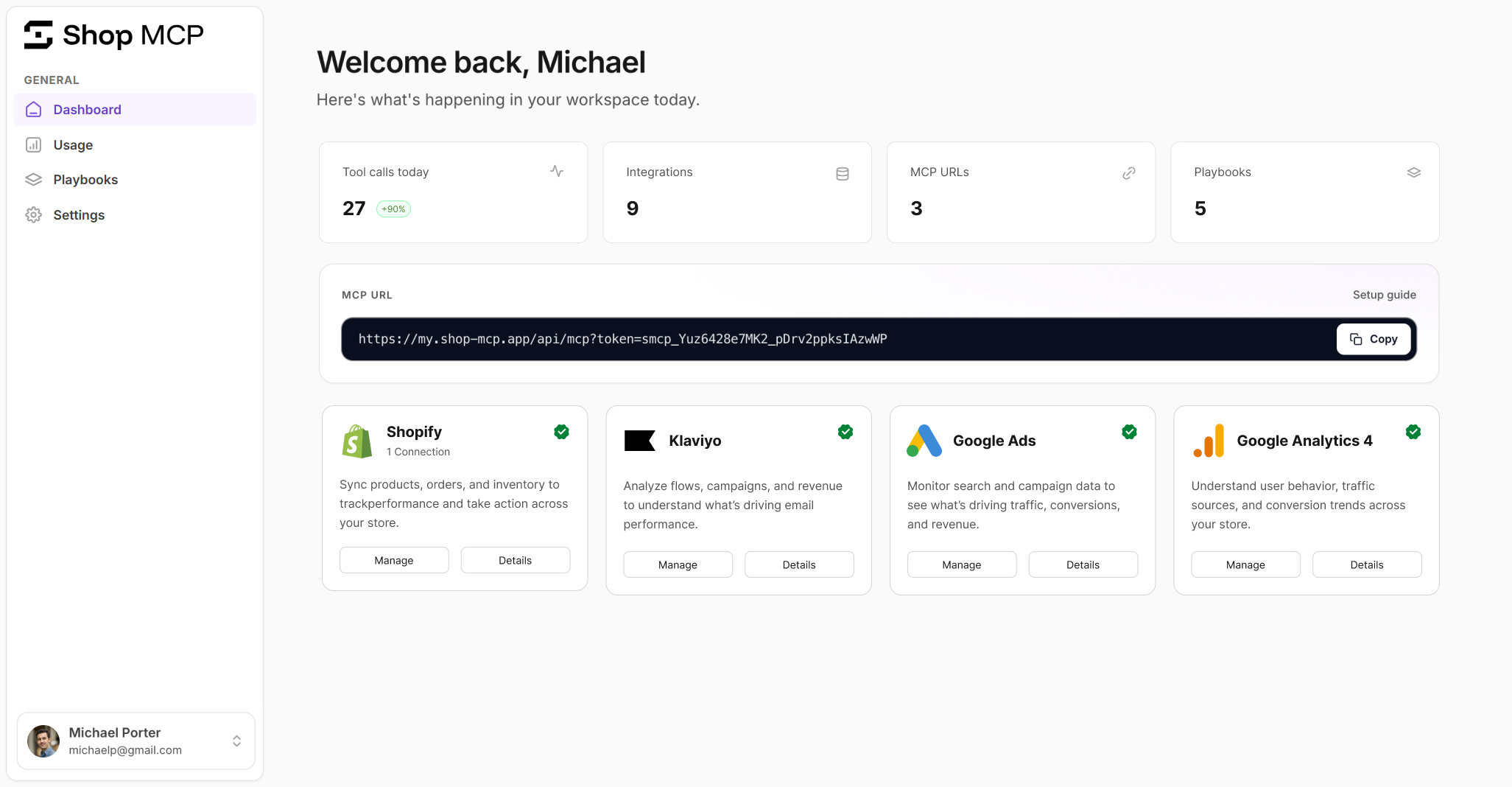
Week 1 — Layer 2 first. Pick one client. Connect their Shopify, Klaviyo, GA4, and Google Ads to ShopMCP. Run the morning-dashboard prompt every day for a week. The point is to feel the difference before you scale.
Week 2 — Layer 1 + Layer 4. Pick your AI client (Claude Desktop is the safest default in 2026). Set up the Notion prompt library. Add the five prompts from How to ask AI questions about your Shopify store. Add a sixth that's specific to one of your clients.
Week 3 — Scale Layer 2 to 3-5 clients. Add Layer 3. Connect the rest of your active clients. Wire ShopMCP outputs into Slack channels. Run the morning summary as a Slack post, not just a private prompt — it's the moment the rest of the team sees the value.
Week 4 — Layers 5, 6, 7 as fits. Don't add layers that don't fit your agency's mix. Creative-heavy? Layer 5 next. Code-heavy? Layer 6. Lots of client meetings? Layer 7. Skip the rest.
By Day 30 you have a stack that's actually running, not a deck that pitches one. By Day 60 the prompt library has 25-50 entries and the team owns it. By Day 90 you're not reading articles like this one — you're writing them.
The bottom line
The agencies that compound in 2026 are the ones whose unit economics improve faster than their competitors'. The seven-layer AI stack is the lever. The stack is well-understood. The hard part is the discipline of actually running it.
Most of what we've described isn't ShopMCP-specific — it's the shape of where this category is going. ShopMCP is one layer (Layer 2) in a larger stack that we hope agencies invest in seriously, regardless of which operator-layer MCP they pick.
Try ShopMCP free → · Read the keystone — what Shopify MCP is · See the morning dashboard playbook
Frequently asked questions
What AI tools do ecommerce agencies actually use in 2026? The seven-layer agency AI stack as of 2026: an AI client (Claude Desktop / ChatGPT / Cursor), an operator-layer MCP server (ShopMCP) for data access, Slack with AI integrations, Notion with AI search, Figma with AI variants, Cursor for code work, and Granola or Fireflies for meeting capture. The exact mix varies by agency size and specialization, but the layers do not.
How much time does AI save an ecommerce agency? Across the small group of agencies in the ShopMCP closed beta, the time saved per senior operator clusters in the high single digits to low double digits per week — concentrated in client reporting, wasted-spend audits, Klaviyo flow audits, and ad-creative variant production. Your mileage will vary by team size, client mix, and how aggressively the prompt library is reused. The savings come from collapsing dashboard-juggling and one-off audits into AI-assisted prompts, not from replacing strategic work.
Should an agency build its own AI tools or buy them? Buy the layers, build the workflows. Agencies that try to build operator-layer MCP, AI clients, or AI-meeting-capture tools end up maintaining infrastructure instead of doing client work. Buy the platforms; invest agency-specific judgement in the prompt libraries, the SOPs, and the workflows that wrap the platforms.
Is AI replacing ecommerce agencies? No. AI is replacing the parts of agency work that were always commodity — dashboard-juggling, status-report assembly, copy-paste Klaviyo audits. Strategy, client relationships, judgment calls under uncertainty, and the ability to translate brand intent into ecommerce mechanics — those remain agency work and command higher fees as the commodity layer compresses.
What's the difference between an AI ecommerce agency and a traditional one? An AI-native agency uses AI as the data layer for everything client-facing — reporting, audits, creative variants, prompt-driven optimization workflows. The traditional agency uses dashboards and Excel and bills more hours for the same insights. Same client outcomes, very different unit economics.
More Articles
Your coffee's still warm. Your Monday review is done.
Connect one platform in 5 minutes. Run your first playbook before the kettle boils.


2026 Copyright © ShopMCP. All rights reserved. A Perceptiv Digital initiative.