
Klaviyo
Klaviyo MCP: How to Query Your Email Data with AI (2026)
Date
Author
Igor Cerjan
A Klaviyo MCP server connects your Klaviyo account to Claude, ChatGPT, or Cursor through the Model Context Protocol — so you can audit flows, prune segments, evaluate campaigns, and diagnose underperformance using plain-English prompts instead of clicking through the Klaviyo UI. Setup is 10 minutes. The first five queries below earn back the install on day one.
If you're already using ShopMCP for Shopify, adding Klaviyo is a private API key paste-in. If you're new, this tutorial assumes you're starting from a connected Shopify store and adding Klaviyo as a second platform.
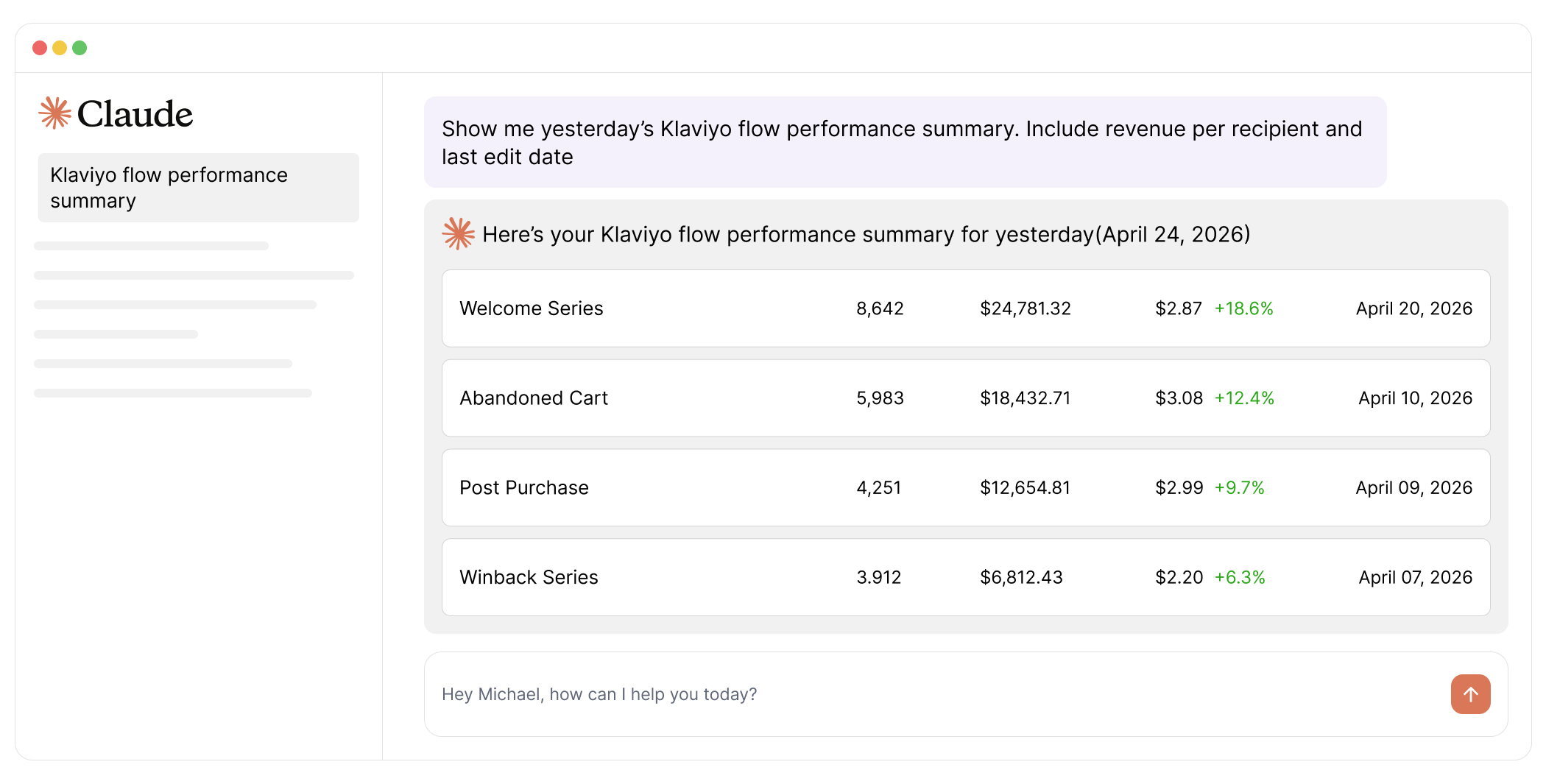
{SCREENSHOT: hero — Claude Desktop showing a Klaviyo flow-performance summary table returned via ShopMCP, with revenue per recipient + last edit date columns visible}
What Klaviyo MCP is
A Klaviyo MCP server is a service that exposes Klaviyo's API — lists, segments, flows, campaigns, profiles, events — as tools that an AI assistant can call. Instead of "open the Klaviyo flows tab, sort by revenue, click into each one to compare metrics," you say "summarize the last 30 days of flow performance and flag anything below account average" and get a structured answer in seconds.
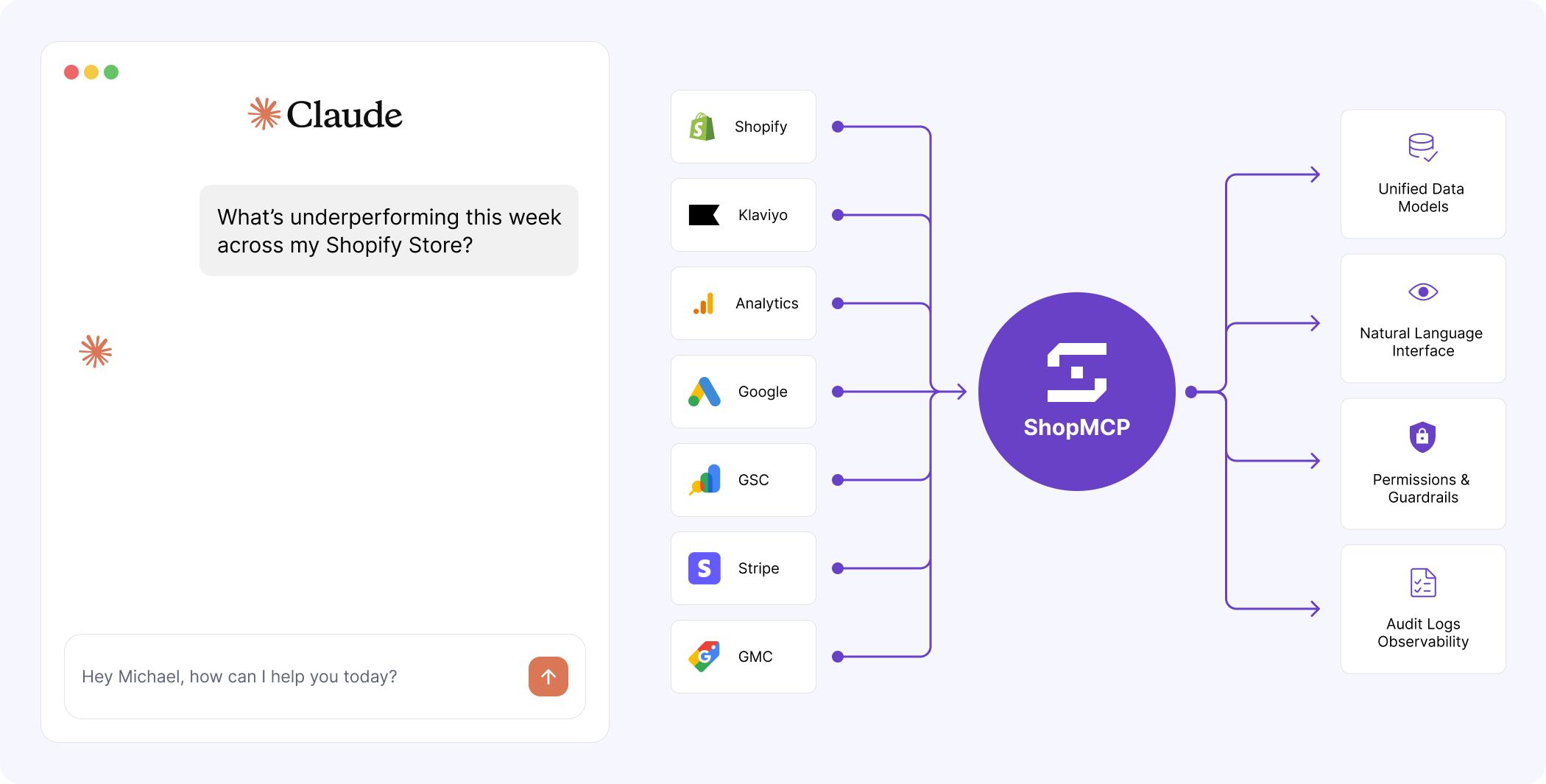
ShopMCP includes a Klaviyo MCP server bundled with Shopify, GA4, Google Ads, GSC, Stripe, Google Merchant Center, and the rest of the ecommerce operator stack — so cross-platform questions work in one prompt without setting up a separate MCP server per platform.
As of the `2026-07-15` stable API revision, ShopMCP registers 201 Klaviyo tools: 80 reads and analyses plus 121 gated write tools covering all 124 authenticated GA mutations. The count matters less than the contract: the revision is pinned, writes are separately gated per workspace, and the coverage ledger is checked against Klaviyo's stable OpenAPI specification.
There are also open-source standalone Klaviyo MCP repos on GitHub. They work for single-account dev exploration; they don't scale to agency workflows the way a hosted operator-layer MCP does.
Before you start
You'll need:
- Klaviyo private API key access. Create a key under Klaviyo Account -> Settings -> API keys. Use read scopes for analysis, or full scopes if you want ShopMCP write tools after enabling the dashboard toggle.
- An AI client with MCP support — Claude Desktop, Claude Code, Cursor, or ChatGPT Plus/Pro/Team/Enterprise. Setup tutorials: Connect Claude · Connect ChatGPT.
- A ShopMCP account with at least one platform already connected (Shopify is most common starting point).
Step 1: Connect Klaviyo to ShopMCP (3 min)
In your ShopMCP dashboard, go to Settings → Integrations → Klaviyo.
In Klaviyo, create a private API key. The read-only recipe grants Read on every resource ShopMCP analyzes. The operational recipe grants Full on those resources so write tools can work after you turn on ShopMCP's Allow writes toggle.
{SCREENSHOT: Klaviyo private API key creation screen showing the ShopMCP key name and read/full scope choices}
Paste the key into ShopMCP. ShopMCP validates it against Klaviyo's account endpoint, stores it encrypted, and shows Klaviyo as connected. Your AI client picks up the new tools on the next MCP session or tool-list refresh.
{SCREENSHOT: ShopMCP Klaviyo settings page showing a connected account, account label, and Allow writes toggle off}
For agency operators: connect Klaviyo per client workspace. ShopMCP keeps each client's Klaviyo account isolated; switching context between clients is one prompt.
Step 2: Run your first five Klaviyo queries
These five cover the operator-shaped use cases most teams run weekly. Each is read-only.
1. Flow performance summary
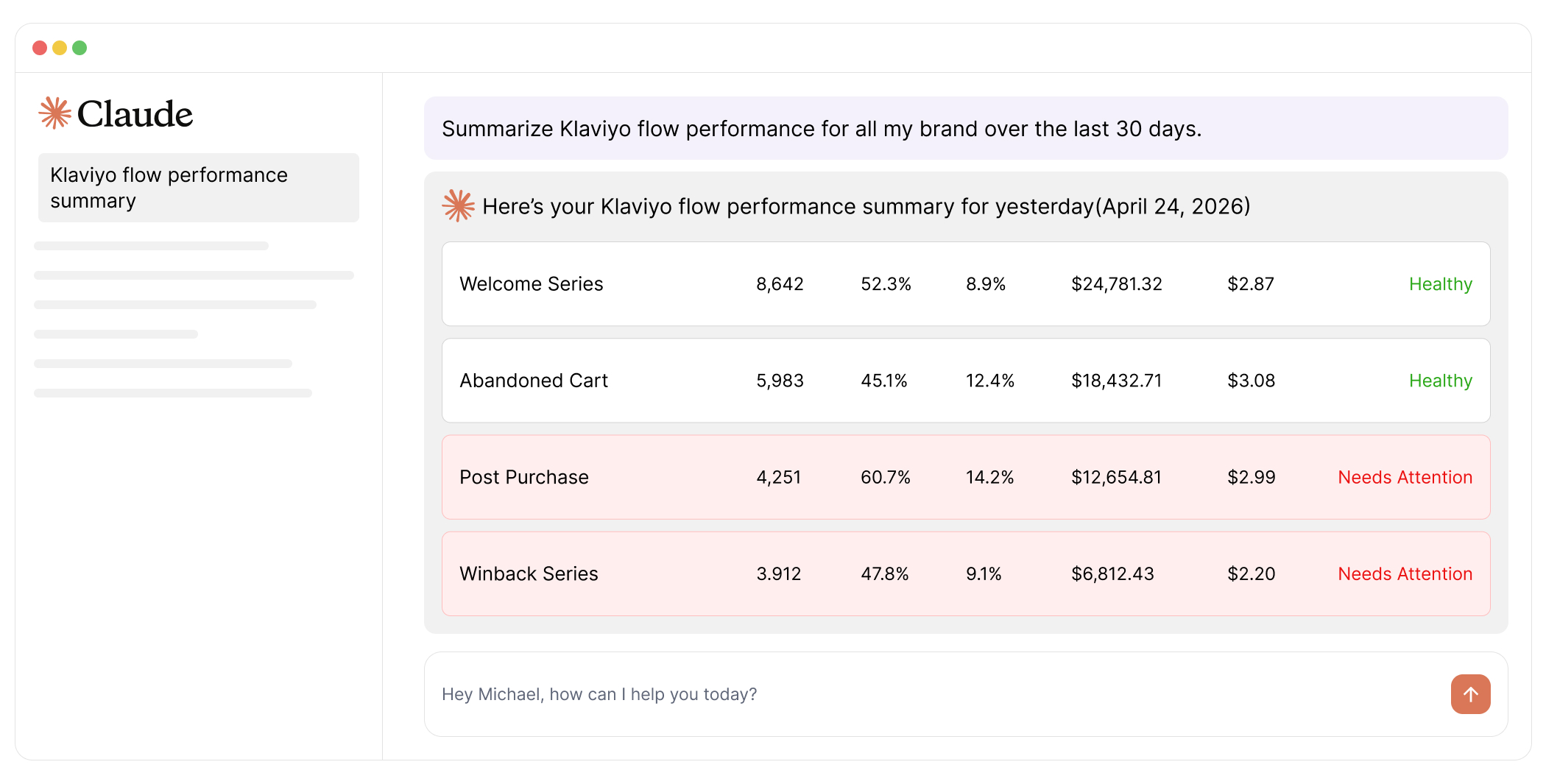
Summarize Klaviyo flow performance for {Brand X} over the last 30 days. Show flow name, send volume, open rate, click rate, revenue, revenue per recipient, and last edit date. Flag any flow with > 60-day-old content that's also below the account average for revenue per recipient.
This is the workhorse audit query. ShopMCP fans out across Klaviyo flow and reporting tools, joins with last-edit metadata, and returns a structured summary. {SCREENSHOT: Claude response showing the flow table with red/green indicators on the flagged rows}
2. List growth and unsubscribes
For {Brand X}, summarize Klaviyo list growth in the last 90 days: new subscribers per week, unsubscribes per week, list size trend, and whether net growth is accelerating, decelerating, or flat.
Catches the unsubscribe spike from last month's send-too-many week.
3. Top campaigns last 30 days
Top 10 Klaviyo campaigns for {Brand X} by total revenue in the last 30 days. Show subject line, send size, open rate, click rate, revenue, revenue per recipient. What was different about the top three?
The "what was different" prompt is where AI synthesis pays — Claude pattern-matches across the top entries and surfaces the common thread (e.g. "shorter subject lines, sent on Tuesday morning, all included a percentage discount").
4. Inactive segments worth pruning
Find Klaviyo segments where engagement (opens or clicks in the last 90 days) is below 5%. Show segment name, size, last sent-to date, and recent revenue contribution. Recommend a pruning order.
Useful before a quarterly list cleanup. Don't act on the recommendation blindly — verify a sample before pruning anything.
5. The diagnostic prompt
Welcome flow for {Brand X} dropped its open rate from 48% to 31% in the last 30 days. Show me what changed. Look at: subject line edits, sender changes, send-time changes, recipient cohort changes, and any recent list-source changes.
This is the prompt that makes the install pay for itself. Klaviyo's UI doesn't have a "diff this flow's performance against last quarter and tell me why" view. The AI does.
Cross-platform: pair Klaviyo with Shopify and Google Ads
The thing dashboards can't do — and where ShopMCP earns the operator-layer label — is cross-platform queries.
For {Brand X}, correlate Shopify revenue last week vs prior week with: Klaviyo flow revenue changes, top-of-funnel ad spend (Google Ads), and any major catalog or pricing changes. What's the most likely driver of the revenue change?
ShopMCP runs Shopify, Klaviyo, and Google Ads tool calls in parallel, joins the results, and lets Claude reason across all three. You get a one-paragraph answer with the data table backing it.
This is the answer to "why are we down this week?" that previously required three dashboards and a spreadsheet.
Common gotchas
"Klaviyo says authentication failed." Confirm the private API key starts with `pk_`, has not been revoked, and includes the scopes needed for the category you're calling. If you're delegating from an agency seat, ask the client account owner to mint the key or give you a scoped key they control.
"I see Klaviyo connected but the AI says no Klaviyo tools." For a brand-new ShopMCP install, start a new AI-client session after adding the connector. For an existing install adding Klaviyo as a second platform, allow the tool list to refresh. If the tools still don't appear after a minute, check the dashboard. Connection validation proves the key can read the account; it does not enumerate every private-key scope. A revoked key fails validation, while a missing resource scope is authoritatively reported by Klaviyo when that operation returns 403.
"Tool call timeout on flow queries." Klaviyo's API rate-limits queries against accounts with thousands of segments or flows. ShopMCP retries with backoff, but on busy queries it can still hit the ceiling. Narrow the query (specific brand, specific date range, specific flow) and try again. The most reliable pattern for very large accounts is to ask first for a flow inventory ("list all active flows by name and last edit date"), then iterate against subsets rather than asking for everything in one shot.
"Can the AI send a Klaviyo campaign?" Yes, but only when two gates are open: the connected Klaviyo key has the required full scope, and the ShopMCP Allow writes toggle is on. Sending still requires explicit confirmation in the AI conversation. Use `klaviyo_get_campaign_recipient_estimation` and review the subject line, audience, and send time before approving a send.
Current write coverage and custom profile properties
ShopMCP covers every authenticated mutation in Klaviyo's `2026-07-15` stable API, including campaigns, flows and actions, lists, segments, profiles and subscriptions, catalogues, coupons, templates and universal content, tags, forms, reviews, webhooks, Custom Objects, conversation messages, tracking settings, web feeds, and privacy requests. Writes require the workspace gate; consequential operations add tool-specific confirmation and preflight validation.
Custom profile properties do not have a separate global schema in Klaviyo. They are keys inside `profile.attributes.properties`. Use `klaviyo_set_profile_custom_properties` to create or update values and `klaviyo_unset_profile_custom_properties` to set selected keys to `null` on one profile. Klaviyo does not provide global property-definition CRUD or an account-wide purge operation, so account-wide cleanup needs controlled per-profile updates or Klaviyo Support.
A 6th cross-platform example — the campaign-postmortem prompt
Once you've connected Klaviyo alongside Shopify and Google Ads, the highest-leverage prompt is the post-campaign diagnostic:
We sent {Brand X}'s "Black Friday teaser" Klaviyo campaign yesterday. Pull: send size, opens, clicks, revenue, RPR. Now correlate with same- day Shopify orders (was the lift attributable?) and same-day Google Ads behavior (did paid spend swing?). Then summarize: did this campaign work, and if not what's the most likely cause?
Three platforms in one query, joined by date. Claude returns a paragraph-and-table answer in 60-90 seconds. The same diagnostic in dashboard form takes most of an afternoon.
What's next
The Klaviyo flow audit playbook (Wk11) is the deeper version of query #1. The Klaviyo prompts library (Wk12) covers 30 more prompts the team uses. For agency-shaped Klaviyo content, see Klaviyo agencies: the AI tools your team should be using (Wk9).
Frequently asked questions
What is a Klaviyo MCP server? A Klaviyo MCP server is a service that exposes Klaviyo data and actions to AI assistants via the Model Context Protocol. ShopMCP includes a Klaviyo MCP server bundled with Shopify, GA4, Google Ads, and other platforms — one connection, cross-platform queries.
Can Claude write to Klaviyo? Yes. ShopMCP exposes all authenticated mutations in Klaviyo's pinned stable API, but writes require the workspace gate and the private key's upstream scope. Consequential operations such as live-flow changes and campaign sends add explicit confirmation and preflight review.
Is there an open-source Klaviyo MCP server? A handful of OSS Klaviyo MCP repos exist on GitHub. They're useful for single-account dev work but require manual API-key setup per account, which becomes painful for agencies running multiple clients. ShopMCP handles auth and rate limits for you.
How is Klaviyo MCP different from Klaviyo AI? Klaviyo AI is Klaviyo's own bundled AI features inside the Klaviyo product — subject-line optimization, send-time prediction, copy generation. Klaviyo MCP exposes Klaviyo data to your external AI assistant (Claude, ChatGPT, Cursor) so you can analyze, audit, and operate Klaviyo from outside the Klaviyo UI.
More Articles
Your coffee's still warm. Your Monday review is done.
Connect one platform in 5 minutes. Run your first playbook before the kettle boils.


2026 Copyright © ShopMCP. All rights reserved. A Perceptiv Digital initiative.